









































































































 中文
中文

使用raspberry Pi 搭建一个小型的的wifi网络,使得连接至热点的各个设备可以进行通信。
工具安装
HOSTAPD
Raspberry Pi 上需要安装一个ap 软件: hostapd。
sudo apt install hostapd使能hostapd 开机启动
sudo systemctl unmask hostapd
sudo systemctl enable hostapd
网络管理服务
需要提供一个网络管理服务(DNS,DHCP)给客户端,Raspberry Pi 上使用dnsmasq。
sudo apt install dnsmasq配置网络路由
Raspberry Pi 将运行和管理独立的无线网络。它将在无线网络与以太网中实现路由,为无线客户端提供互联网访问。
无线配置
Raspberry Pi 运行DHCP服务,需要给wlan0 一个静态IP。
sudo nano /etc/dhcpcd.conf在文件末尾加上
interface wlan0
    static ip_address=192.168.4.1/24
    nohook wpa_supplicant
配置DHCP和DNS
dnsmasq提供了DHCP和DNS服务,配置非常简单
sudo mv /etc/dnsmasq.conf /etc/dnsmasq.conf.orig
sudo nano /etc/dnsmasq.conf
写入如下内容,并保持:
interface=wlan0 # Listening interface
dhcp-range=192.168.4.20,192.168.4.50,255.255.255.0,24h
                # Pool of IP addresses served via DHCP
domain=wlan     # Local wireless DNS domain
address=/gw.wlan/192.168.4.1
                # Alias for this router
Raspberry Pi 将分配192.168.4.20 到 192.168.4.50 之前的ip给连接设备,租赁时间为24小时。连接设备可以通过gw.wlan域名访问Raspberry Pi。
确保wifi射频打开
pi@raspberrypi:~ $ sudo rfkill unblock wlan

pi@raspberrypi:~ $ sudo rfkill list
0: phy0: Wireless LAN
        Soft blocked: no
        Hard blocked: no
1: hci0: Bluetooth
        Soft blocked: no
        Hard blocked: no
配置AP
sudo nano /etc/hostapd/hostapd.conf输入一下内容:
country_code=CN
interface=wlan0
ssid=NameOfNetwork
hw_mode=g
channel=7
macaddr_acl=0
auth_algs=1
ignore_broadcast_ssid=0
wpa=2
wpa_passphrase=raspberry
wpa_key_mgmt=WPA-PSK
wpa_pairwise=TKIP
rsn_pairwise=CCMP- country_code 国家编码
- hw_mode
- ssid WiFi 名
- wpa_passphrase 密码
重启
sudo reboot
扫描连接Wifi: NameOfNetwork
密码: raspberry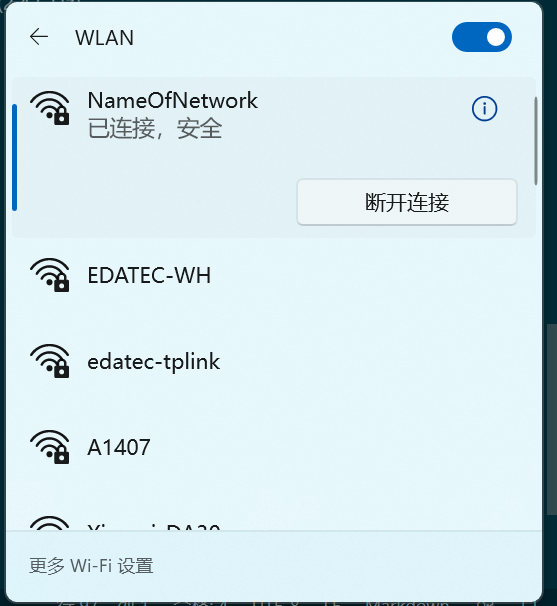 ping 测试: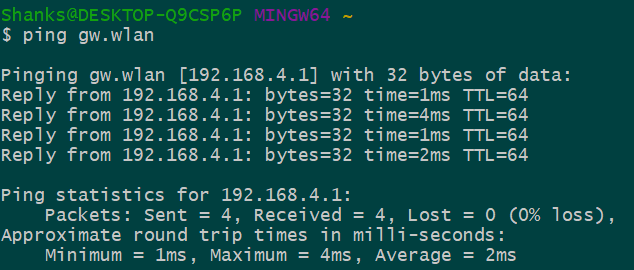
通过Raspberry Pi访问互联网
目前可以连接上Raspberry Pi AP,但是无法通过raspberry 的以太网上网。通过路由和ip伪装可以实现 wifi连接raspbery上网功能。
安装netfilter-persistent 和 iptables-persistent
sudo DEBIAN_FRONTEND=noninteractive apt install -y netfilter-persistent iptables-persistent启用路由,允许从一个网络访问到另一个网络:
sudo nano /etc/sysctl.d/routed-ap.conf写入:
# Enable IPv4 routing
net.ipv4.ip_forward=1
路由将允许通过192.168.4.0/24到达局域网,主路由通向互联网。为了连接设备能与外网通信,而不修改主路由配置,可以使用 "masquerade" 防火墙规则,将wifi连接设备ip 替代为LAN上的地址。
- 主路由 将WiFi客户端的向外访问当作来至Raspberry Pi,允许和互联网通信
- Raspberry Pi将所有向里访问替换IP,并转发到原始WiFi客户端
添加防火墙规则
sudo iptables -t nat -A POSTROUTING -o eth0 -j MASQUERADEping 测试: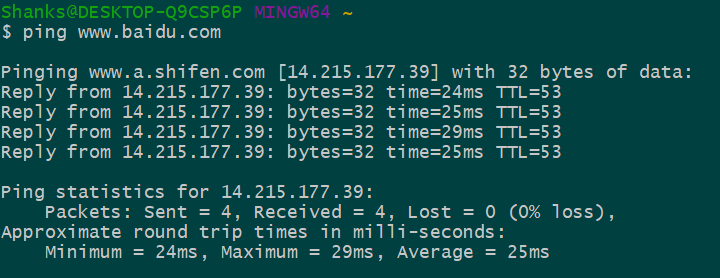
可以通过Raspberry Pi AP 上网了。


