
1 Hardware Manual
This chapter introduces the product overview, package contents, appearance, buttons, indicators, and interfaces.
1.1 Overview
ED-CLAWBOX is a compact OpenClaw mini unit based on the Raspberry Pi CM5, featuring 4GB of RAM and 64GB of storage, and comes pre-installed with the JishuShell operating system. Designed for AI enthusiasts who value efficiency, security, and elegance, it eliminates complex deployment procedures—allowing you to step into a powerful AI experience right out of the box. By fully leveraging the hardware’s potential, it effortlessly handles a variety of local AI inference and computing tasks.
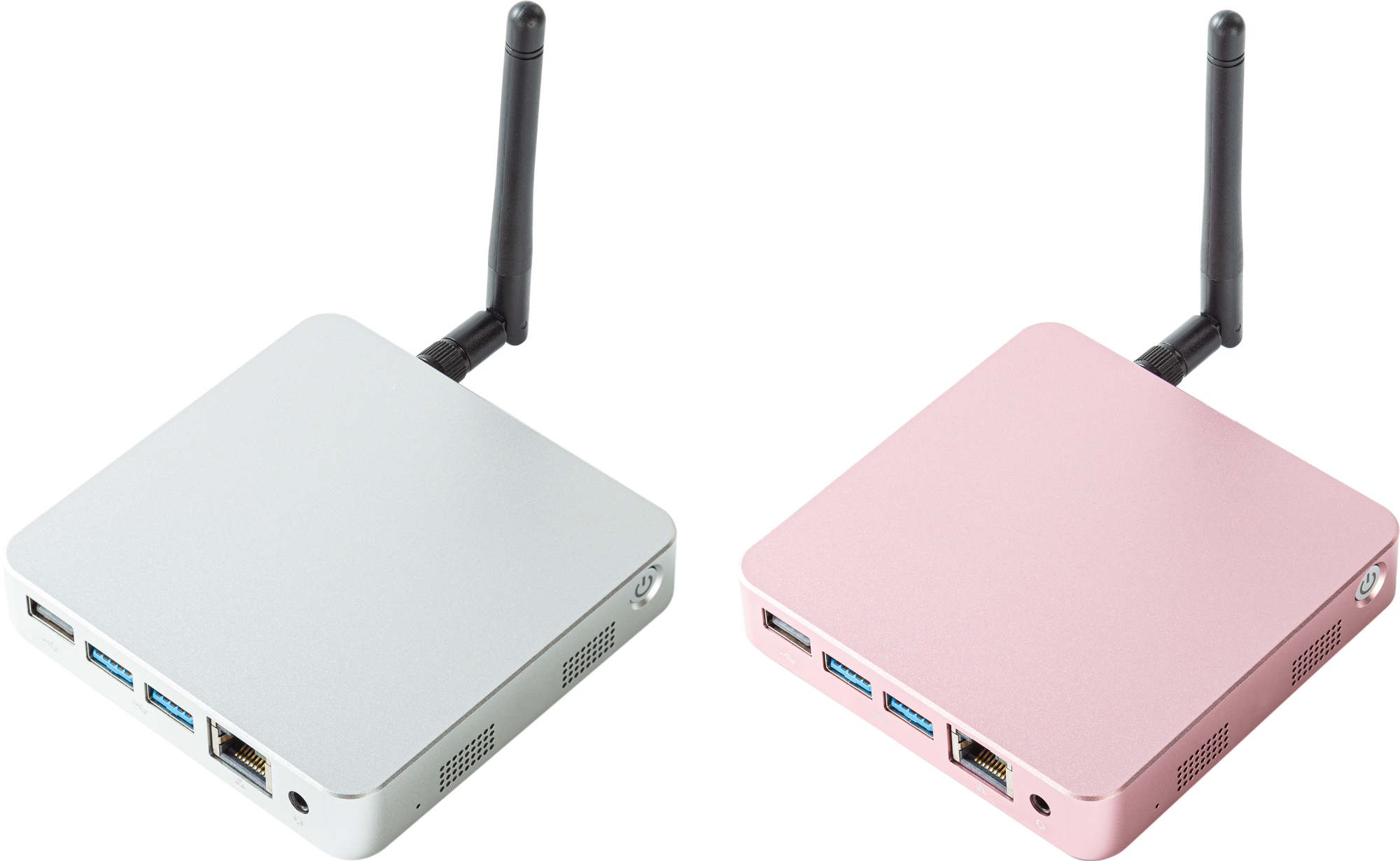
1.2 Packing List
- 1 x ED-CLAWBOX Unit
- 1 x 2.4GHz/5GHz Wi-Fi/BT Antenna
1.3 Appearance
This section describes the function and definition of the interfaces on each panel.
1.3.1 Front Panel
Describes the interface types and definitions on the front panel.

| NO. | Function Definition |
|---|---|
| 1 | 1 x Speaker, 8Ω 0.8W, for external audio playback. |
| 2 | 1 x Speaker, 8Ω 0.8W, for external audio playback. |
| 3 | 1 x ON/OFF Button, with a blue indicator, for powering the device ON and OFF. |
1.3.2 Rear Panel
Describes the interface types and definitions on the rear panel.

| No. | Function Definition |
|---|---|
| 1 | 1 x DC Input, USB Type-C Connector, supports 5V 5A power input. |
| 2 | 1 x HDMI, Type-A HDMI Connector, compliant with HDMI 2.0, supports 4K 60Hz resolution, for connecting a display. |
| 3 | 1 x HDMI, Micro HDMI Connector, compliant with HDMI 2.0, supports 4K 60Hz resolution, for connecting a display. |
| 4 | 1 x Micro SD Card Slot, for installing an SD card to boot the system. |
1.3.3 Side Panel
Describes the interface types and definitions on the side panel.

| No. | Function Definition |
|---|---|
| 1 | 1 x Wi-Fi/BT Antenna Port, SMA connector, for connecting the Wi-Fi/BT antenna. |
| 2 | 1 x USB 2.0, Type-A Connector, supports up to 480Mbps data transfer rate. |
| 3 | 2 x USB 3.0, Type-A Connector, each supports up to 5Gbps data transfer rate. |
| 4 | 1 x 1000M Ethernet, RJ45 connector, with LED indicators, 10/100/1000M auto-negotiation, for Ethernet connection. |
| 5 | 1 x Audio Input/Stereo Output, 3.5mm Audio Jack, can be used for microphone input and stereo output.
|
1.4 Button
The ED-CLAWBOX includes one ON/OFF button with a blue indicator. The silkscreen on the case is " ".
".
- After the device is powered on, the system will start booting. The indicator light flashes 5 times and then remains steadily blue.
- Short Press: When the device is powered off (with the power supply properly connected), press the button to turn on the device. The indicator light flashes 5 times and then remains steadily blue.
- Long Press: When the device is powered on normally, press and hold the button for 5 seconds or more to force the device to shut down. At the same time, the indicator light will turn off.
1.5 Indicator
Describes the status and meaning of the indicators on the ED-CLAWBOX device.
| Indicator | Status | Description |
|---|---|---|
| Green indicator of Ethernet port | On | The data transmission is abnormal. |
| Blink | Data is being transmitted over the Ethernet port. | |
| Off | The Ethernet connection is not set up. | |
| Yellow indicator of Ethernet port | On | The Ethernet connection is in the normal state. |
| Blink | The Ethernet connection is abnormal. | |
| Off | The Ethernet connection is not set up. |
1.6 Interface
Describes the definition and function of each interface on the product.
1.6.1 Micro SD Card Slot
The ED-CLAWBOX includes one Micro SD card slot. The silkscreen for the slot is " ". It supports installing a Micro SD card for booting the system.
TIP
- The device comes with an SD card pre-installed with the operating system by default.
- Do not remove or insert the SD card unless you need to reinstall the operating system.
1.6.2 Power Supply Interface
The ED-CLAWBOX includes one power input using a USB Type-C connector. The silkscreen for the interface is " ", supporting 5V 5A power input.
TIP
The Raspberry Pi 27W USB-C Power Supply is recommended.
1.6.3 Audio Interface
The ED-CLAWBOX includes one audio input, a 3.5mm 4-pole headphone jack. The silkscreen for the interface is " ". It supports OMTP standard stereo headphone output and single-channel microphone recording.
- When headphone is connected, the audio output switches to the headphone.
- When no headphone is connected, the audio output switche to the Speaker.
1.6.4 1000M Ethernet Interface
The ED-CLAWBOX includes one auto-negotiating 10/100/1000M Ethernet interface. The silkscreen for the interface is " ". It uses an RJ45 connector. It is recommended to use Cat6 or higher specification network cables when connecting to Ethernet. The pin definitions for the connector are as follows:
 | Pin | Definition |
|---|---|---|
| 1 | TX1+ | |
| 2 | TX1- | |
| 3 | TX2+ | |
| 4 | TX2- | |
| 5 | TX3+ | |
| 6 | TX3- | |
| 7 | TX4+ | |
| 8 | TX4- |
1.6.5 HDMI Interface
The ED-CLAWBOX includes 1 standard HDMI port and 1 Micro HDMI port. The silkscreen is "HDMI". They support connecting to an HDMI display, with a maximum video output of 4Kp60.
1.6.6 USB 2.0 Interface
The ED-CLAWBOX includes one USB 2.0 interface. The silkscreen is " ", a standard Type-A port. It supports connecting standard USB 2.0 peripherals, with a maximum transfer rate of 480Mbps.
1.6.7 USB 3.0 Interface
The ED-CLAWBOX includes 2 USB 3.0 interfaces. The silkscreen is " ", standard Type-A ports. They support connecting standard USB 3.0 peripherals, with each supporting a maximum transfer rate of 5Gbps.
1.6.8 Antenna Interface
The ED-CLAWBOX includes one SMA antenna connector. The silkscreen is " " and "
 ", for connecting the Wi-Fi/BT antenna.
1.6.9 Speaker
The ED-CLAWBOX includes 2 speakers, 8Ω 0.8W each, supporting external audio playback.
TIP
When headphone is connected to the audio port, the speaker has no audio output.