
Occasional Abnormalities in 100M Ethernet Port or 4G Module
1 Overview
Background and Applicability of Occasional Abnormalities in 100M Ethernet port or 4G module.
1.1 Background
Issue Description:
- Customers have reported intermittent failures in the 100M Ethernet port of the ED-IPC2600 device under the following scenarios:
- Rapid Power Cycling: Manual power interruption followed by re-powering within 3–4 seconds during normal operation.
- Extended Runtime: Continuous operation over prolonged periods.
Observed Symptoms: Network connectivity is interrupted, rendering the device unable to access the internet. When executing the
lsusbcommand in the terminal, only Device 001 is detected (as shown in the figure below), with no recognition of other extended USB interfaces. Device reboot temporarily restores Ethernet port functionality.
- Customer feedback indicates that during prolonged operation of the ED-CM4SEN device, the 4G module exhibits intermittent abnormalities: manifested as the 4G module failing to connect to the network and inability to access the internet via 4G. At this time, executing the
lsusbcommand in the command pane returns information as shown in the figure below (only Device 001 is detected, and no other extended USB interfaces can be queried). This issue can be temporarily resolved by rebooting the device to restore 4G module functionality.
TIP
- The interfaces for both the 100M Ethernet port and the 4G module on the ED-IPC2600 are extended via a USB hub.
- The interface of the 4G module on the ED-CM4SEN is extended via a USB HUB.
- Root Cause Analysis:
Engineering investigation confirmed a design flaw in the USB hub chip shared by ED-IPC2600 and ED-CM4SEN. Under specific conditions—prolonged operation or repeated power cycling—the chip exhibits intermittent failures, causing functional loss in either the 100M Ethernet port or 4G module.
TIP
Since the USB 2.0 interfaces of both ED-IPC2600 and ED-CM4SEN are also extended via a USB hub, if similar abnormalities occur on the USB 2.0 interfaces, they can be attributed to a defect in the USB hub chip.
- Solution:
To address this issue, our company has developed a dedicated utility package usb-tools. This tool continuously monitors the operational status of the 100M Ethernet port or USB devices. Upon detecting abnormalities, it automatically triggers either:
- Reset of the USB hub chip, or
- Full device reboot to restore normal functionality of the Ethernet port or 4G module, without manual user intervention.
1.2 Applicability
The specific product models involved are as follows:
- ED-CM4SEN
- ED-IPC2100
- ED-HMI2120-070C
- ED-HMI2120-101C
- ED-IPC2600
- ED-HMI2630-101C
- ED-IPC3100
- ED-HMI3120-070C
- ED-HMI3120-101C
- ED-IPC3630
- ED-HMI3630-101C
TIP
Since the ED-IPC2600 utilizes the ED-IPC21x0 motherboard, our engineering validation and testing confirm that all devices equipped with ED-IPC21x0 motherboards may potentially exhibit abnormalities in their 100M Ethernet ports.
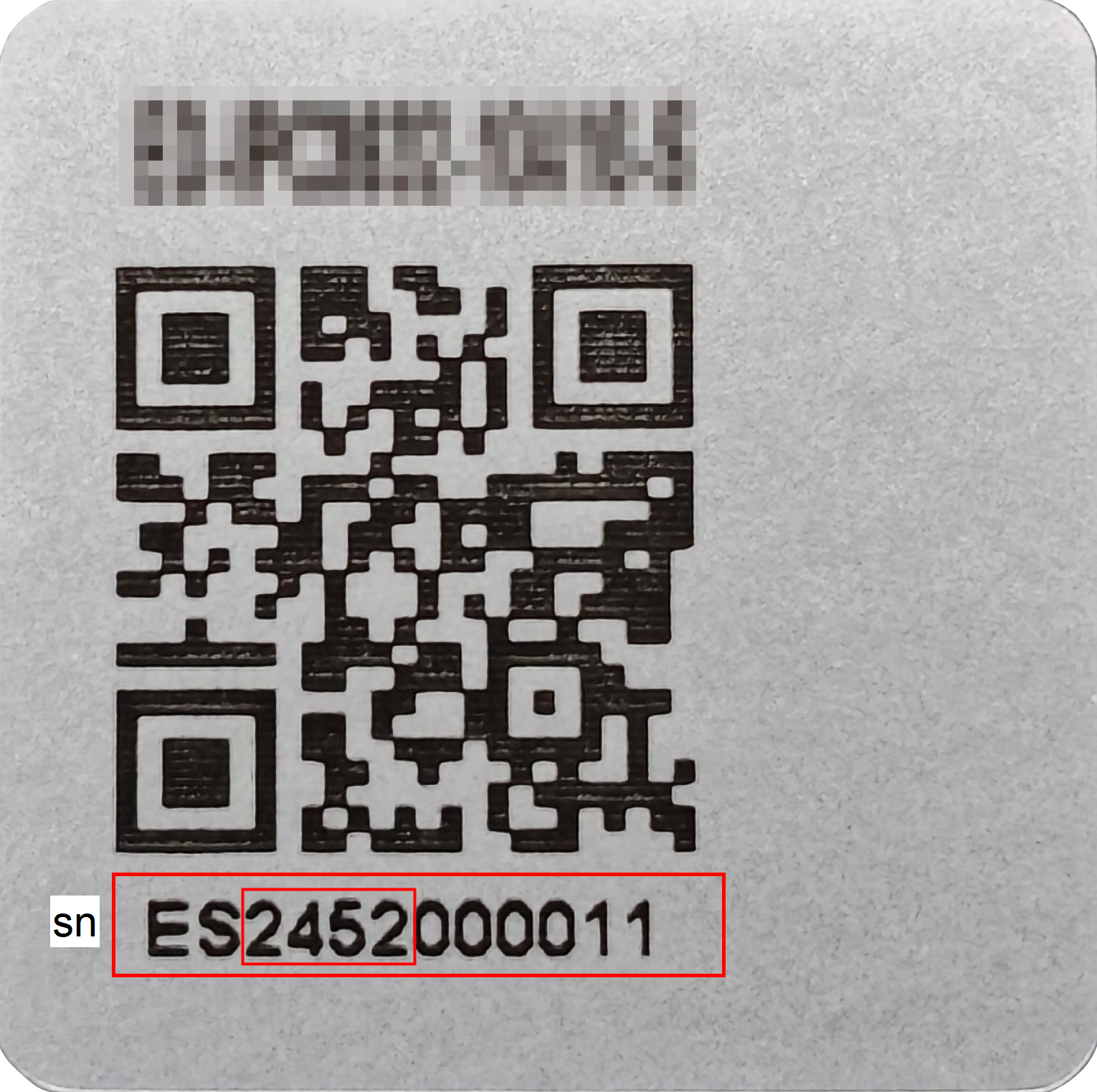
Products manufactured on or after Week 36, 2025 have the usb-tools package pre-installed by default and are not affected by this issue.
- The product label containing the device SN (Serial Number) is typically located on the device enclosure. If the first four digits of the SN are ≥2536, the device was manufactured during or after Week 36, 2025.
2 Solution
If users encounter the above-mentioned 100M network port or 4G module abnormalities while using devices such as ED-CM4SEN, ED-IPC2100, ED-IPC2600, ED-IPC3100, ED-IPC3630, ED-HMI2120-070C/101C, ED-HMI2630-101C, ED-HMI3120-070C/101C, and ED-HMI3630-101C, they can install our company’s developed usb-tools software package to detect abnormalities and automatically trigger USB HUB reset or device reboot to repair the abnormality.
For different hardware PCBA versions of devices, different handling mechanisms are implemented.
- ED-CM4SEN V1_3 and below versions, ED-IPC21x0 V1_2 and below versions: Since the reset pin of the USB HUB is not led out, device reboot is automatically triggered when abnormalities are detected to restore the normal functionality of the network port or 4G module.
- ED-CM4SEN V1_4 and ED-IPC21x0 V1_3: Since the reset pin of the USB HUB is led out, USB HUB chip reset is automatically triggered when abnormalities are detected to restore the normal functionality of the network port or 4G module.
TIP
The PCBA version of the device can only be viewed by opening the device case.
Preparation:
- The device has completed normal startup and entered the system.
- The device has connected to the Ethernet via Wi-Fi or Ethernet port.
Steps:
- Execute the following commands sequentially in the command pane to add the
edatec aptrepository.
curl -sS https://apt.edatec.cn/pubkey.gpg | sudo apt-key add -
echo "deb https://apt.edatec.cn/raspbian stable main" | sudo tee /etc/apt/sources.list.d/edatec.list
sudo apt update
TIP
If directly copying commands, delete line breaks and replace them with spaces when pasting.
- Execute the following command to install the
usb-toolssoftware package.
sudo apt install ed-usb-tools
- Execute the following command to reboot the device and make the configuration take effect.
sudo reboot
Other Instructions
If users do not wish to reboot the device under special scenarios, they may refer to the following operation steps to disable the installed usb-tools software package.
- Execute the following command in the command terminal pane to open the
ed-usb.inifile.
sudo nano /etc/ed-usb.ini
Add
reboot_on_failure=0to the file.Press
Ctrl+oto save the file, then pressEnterto confirm, and finally pressCtrl+xto exit the file.