
1 Hardware Manual
This chapter introduces the product overview, packing list, appearance, button, indicator and interface.
1.1 Overview
ED-HMI3120-156C is a 15.6-inch industrial HMI based on Raspberry Pi CM5. According to different application scenarios and user needs, different specifications of RAM and eMMC computer systems can be selected.
- Options for 2GB, 4GB, 8GB and 16GB RAM
- Options for 16GB, 32GB and 64GB eMMC storage
ED-HMI3120-156C provides common interfaces such as HDMI, USB 2.0, RS232, RS485, audio and Ethernet, and supports access to the network through Wi-Fi, Ethernet and 4G. ED-HMI3120-156C integrates supercapacitor (backup power supply, which is optional), RTC, Watch Dog, EEPROM and encryption chip, improving the ease of use and reliability of the product. It is mainly used in industrial control and IOT.

1.2 Packing List
- 1x ED-HMI3120-156C Unit
- 1 x Mounting Kit (including 4 x buckles, 4xM4*10 screws and 4xM4*16 screws)
- [Optional Wi-Fi/BT version] 1x 2.4GHz/5GHz Wi-Fi/BT Antenna
- [Optional 4G version] 1x 4G/LTE Antenna
1.3 Appearance
Introducing the functions and definitions of interfaces on each panel.
1.3.1 Front Panel
Introducing the front panel interface types and definitions.

| NO. | Function Definition |
|---|---|
| 1 | 1 x LCD screen, 15.6-inch touch screen with a resolution of 1920x1080, multi-touch capacitive touch screen. |
1.3.2 Rear Panel
Introducing the types and definitions of the rear panel interface.
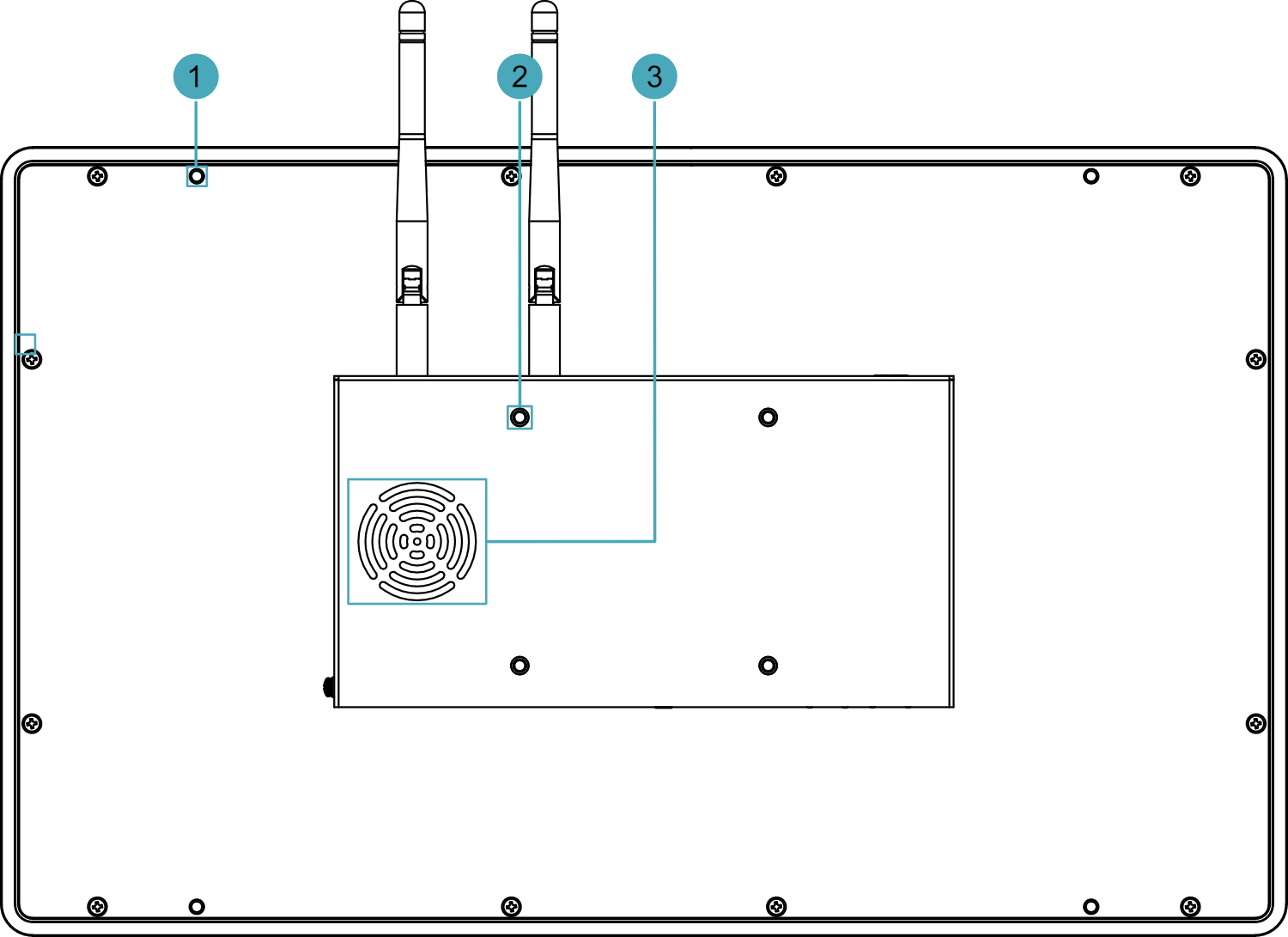
| NO. | Function Definition |
|---|---|
| 1 | 4 x installation holes of snap, which are used to fix the snaps to the device for Embedded installation. |
| 2 | 4 x VESA mounting holes, reserved for VESA bracket installation. |
| 3 | 1 x Speaker, built-in one 4Ω 5W speaker, single-channel stereo audio output. |
1.3.3 Side Panel
Introducing the types and definitions of side panel interfaces.
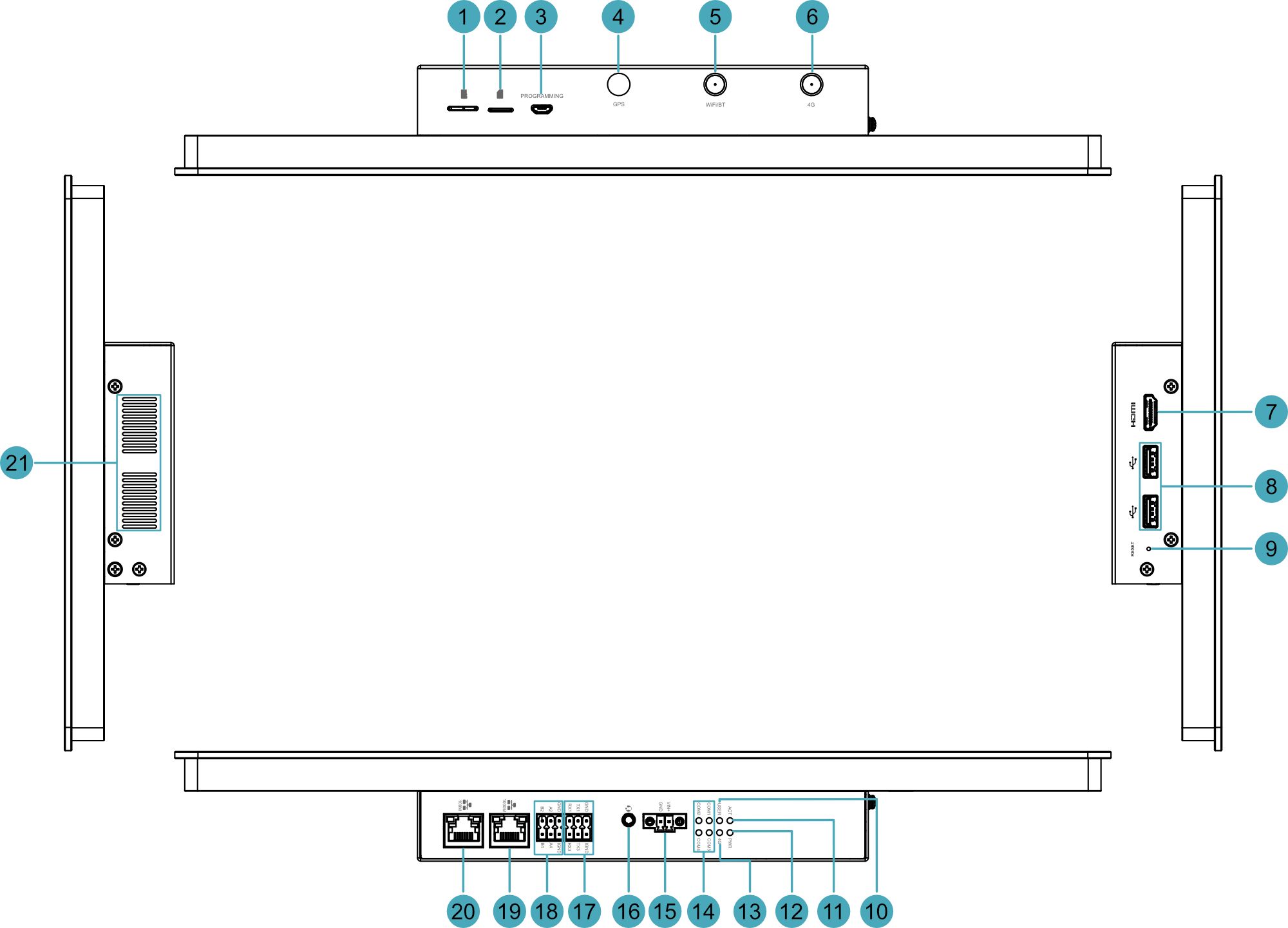
| NO. | Function Definition |
|---|---|
| 1 | 1 x Micro SD card slot, which is used to install Micro SD card for storing user data. |
| 2 | 1 x Nano SIM slot, which is used to install a Nano SIM card for getting 4G signal. |
| 3 | 1 x Micro USB port, which supports to flash to eMMC for the system. |
| 4 | 1 x rubber plug, here solely as a reserve hole. |
| 5 | 1 x Wi-Fi/BT antenna port (optional), SMA connector, which can connect to Wi-Fi/BT antenna. |
| 6 | 1 x 4G antenna port (optional), SMA connector, which can connect to 4G antenna. |
| 7 | 1 x HDMI port, Type-A connector, which is compatible with HDMI 2.0 standard and supports 4K 60Hz. It supports to connect a displayer. |
| 8 | 2 x USB 2.0 ports, Type-A connector, each channel supports up to 480Mbps transmission rate. |
| 9 | 1 x Reset button, pressing the button will reset the device. |
| 10 | 1 x green user indicator, user can customize a status according to actual application. |
| 11 | 1 x green system status indicator, which is used to check the working status of device. |
| 12 | 1 x red power indicator, which is used to check the status of device power-on and power-off. |
| 13 | 1 x green 4G indicator, which is used to check the status of 4G signal. |
| 14 | 4 x green UART indicators, using to check the communication status of UART port. |
| 15 | 1 x DC input, 2-Pin 3.5mm pitch phoenix terminals with screw holes. It supports 12V~24V input, the signal is defined as VIN+/GND. |
| 16 | 1 x Audio input/Stereo output, 3.5mm audio jack connector. It can be used as MIC IN and LINE OUT.
|
| 17 | 2 x RS232 ports, 6-Pin 3.5mm pitch phoenix terminals, which is used to connect third-party control equipment. |
| 18 | 2 x RS485 ports, 6-Pin 3.5mm pitch phoenix terminal, which is used to connect the third-party control equipment. |
| 19 | 1 x 10/100/1000M adaptive ethernet port, RJ45 connector, with led indicator. It can be used to access the network. |
| 20 | 1 x 10/100M adaptive ethernet port, RJ45 connector, with led indicator. It can be used to access the network. |
| 21 | Heat dissipation holes, which help improve cooling performance. |
1.4 Button
ED-HMI3120-156C includes a RESET button, which is a hidden button, and the silkscreen on the case is "RESET". Pressing the RESET button will reset the device.
1.5 Indicator
Introducing the various statuses and meanings of indicators contained in ED-HMI3120-156C.
| Indicator | Status | Description |
|---|---|---|
| PWR | On | The device has been powered on. |
| Blink | Power supply of the device is abnormal, please stop the power supply immediately. | |
| Off | The device is not powered on. | |
| ACT | Blink | The system started successfully and is reading and writing data. |
| Off | The device is not powered on or does not read and write data. | |
| USER | On | User can customize a status according to actual application. |
| Off | The device is not powered on or not defined by the user, and the default status is off. | |
| 4G | On | The dial-up is successful and the connection is normal. |
| Off | 4G signal is not connected or the device is not powered on. | |
| Yellow indicatorof Ethernet port | On | The data transmission is abnormal. |
| Blink | Data is being transmitted over the Ethernet port. | |
| Off | The Ethernet connection is not set up. | |
| Green indicatorof Ethernet port | On | The Ethernet connection is in the normal state. |
| Blink | The Ethernet connection is abnormal. | |
| Off | The Ethernet connection is not set up. | |
| COM1~COM4 | On/Blink | Data is being transmitted. |
| Off | The device is not powered on or there is no data transmission. |
1.6 Interface
Introducing the definition and function of each interface in the product.
1.6.1 Card Slot
ED-HMI3120-156C includes a Micro SD card slot and a Nano SIM card slot.
1.6.1.1 Micro SD Card Slot
The silkscreen on the case of Micro SD card slot is " ", which is used to install Micro SD card for storing user data.
1.6.1.2 Nano SIM Card Slot (optional)
The silkscreen on the case of Nano SIM card slot is " ", which is used to install Nano SIM card for obtaining 4G signals.
1.6.2 Power Interface
The ED-HMI3120-156C includes one power input, 2-Pin 3.5mm pitch phoenix terminals with screw holes. The silkscreen of port is "VIN+/GND", and the pins are defined as follows.
 | Pin ID | Pin Name |
|---|---|---|
| 1 | GND | |
| 2 | 12V~24V |
1.6.3 Audio Interface
ED-HMI3120-156C includes one audio input, the connector is a 3.5mm 4-pole headphone jack. The silkscreen of port is " ", which supports OMTP stereo headphone output and mono microphone recording.
- When the headphone is connected, the audio output is switched to the headphone.
- When the headphone is not connected, the audio output is switched to the speaker.
1.6.4 Speaker
The ED-HMI3120-156C contains a power amplifier output, built-in a 4Ω 5W speaker, supporting single-channel stereo output. When playing audio, if the headphone is connected to the Audio interface, the speaker will have no audio output.
1.6.5 RS232 Interface
ED-HMI3120-156C include 2 RS232 ports, 6-Pin 3.5mm pitch phoenix terminals. The silkscreen of single RS232 is “IGND/TX/RX”.
Pin Definition
Terminal pins are defined as follows:
 | Pin ID | Pin Name |
|---|---|---|
| 1 | GND | |
| 2 | GND | |
| 3 | RS232-1_TX | |
| 4 | RS232-3_TX | |
| 5 | RS232-1_RX | |
| 6 | RS232-3_RX |
The pin names of CM5 corresponding to RS232 interface are as follows:
| Signal | CM5 GPIO Name | CM5 Pin Out |
|---|---|---|
| RS232-1_TX | GPIO4 | UART3_TXD |
| RS232-3_TX | GPIO0 | UART2_TXD |
| RS232-1_RX | GPIO5 | UART3_RXD |
| RS232-3_RX | GPIO1 | UART2_RXD |
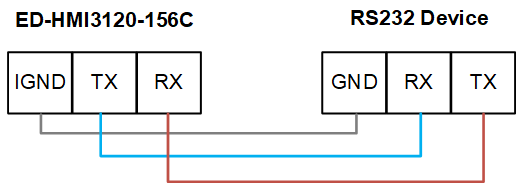
Connecting Cables
Schematic diagram of RS232 wires is as follows:
1.6.6 RS485
ED-HMI3120-156C include 2 RS485 ports, 6-Pin 3.5mm pitch phoenix terminals. The silkscreen of single RS485 is “IGND/A/B”.
Pin Definition
Terminal pins are defined as follows:
 | Pin ID | Pin Name |
|---|---|---|
| 1 | GND | |
| 2 | GND | |
| 3 | RS485-2_A | |
| 4 | RS485-4_A | |
| 5 | RS485-2_B | |
| 6 | RS485-4_B |
The pin names of CM5 corresponding to RS485 interface are as follows:
| Signal | CM5 GPIO Name | CM5 Pin Out |
|---|---|---|
| RS485-2_A | GPIO12 | UART5_TXD |
| RS485-4_A | GPIO8 | UART4_TXD |
| RS485-2_B | GPIO13 | UART5_RXD |
| RS485-4_B | GPIO9 | UART4_RXD |
Connecting Cables
Schematic diagram of RS485 wires is as follows:

RS485 terminal resistance configuration
ED-HMI3120-156C contain 2 RS485 ports. A 120R jumper resistor is reserved between A and B of RS485 line. The jumper cap can be inserted to enable the jumper resistor. By default, the jumper cap is not connected, and the 120R jumper resistor function is disabled. The position of jumper resistor in the PCBA are J24 and J22.
The relationship between the RS485 ports and corresponding COM ports are shown in the table below.
| Location in PCBA | Corresponding COM port | The specific location of the corresponding COM |
|---|---|---|
| J24 | COM4 | 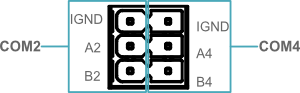 |
| J22 | COM2 |
TIP
You need to open the device case to view the position of 120R jumper resistor.
1.6.7 1000M Ethernet Interface
ED-HMI3120-156C includes one adaptive 10/100/1000M Ethernet port, and the silkscreen is " ". The connector is RJ45, and it is recommended to use the network cable of Cat6 and above. The pins corresponding to the terminal are defined as follows:
 | Pin ID | Pin Name |
|---|---|---|
| 1 | TX1+ | |
| 2 | TX1- | |
| 3 | TX2+ | |
| 4 | TX2- | |
| 5 | TX3+ | |
| 6 | TX3- | |
| 7 | TX4+ | |
| 8 | TX4- |
1.6.8 100M Ethernet Interface
ED-HMI3120-156C includes includes an adaptive 10/100M Ethernet port, and the silkscreen is " ". The connector is RJ45, and it is recommended to use the network cable with Cat6 and above when accessing to network. The pins corresponding to the terminal are defined as follows:
| Pin ID | Pin Name |
|---|---|---|
| 1 | TX+ | |
| 2 | TX- | |
| 3 | Rx+ | |
| 4 | - | |
| 5 | - | |
| 6 | RX- | |
| 7 | - | |
| 8 | - |
1.6.9 HDMI Interface
ED-HMI3120-156C includes one HDMI port, the silkscreen is "HDMI". The connector is Type-A HDMI, which can connect to an HDMI display and supports up to 4Kp60.
1.6.10 USB 2.0 Interface
ED-HMI3120-156C includes 2 USB 2.0 ports, the silkscreen is " ". The connector is Type-A USB, which can connect to standard USB 2.0 peripherals and supports up to 480Mbps transmission rate.
1.6.11 Micro USB Interface
ED-HMI3120-156C includes one Micro USB interface, the silkscreen is "PROGRAMMING" and it can be connected to a PC to flash to eMMC of the device.
1.6.12 Antenna Interface (optional)
The ED-HMI3120-156C includes 2 SMA antenna ports, the silkscreens are "4G" and "Wi-Fi/BT" and they can be connected to the 4G antenna and Wi-Fi/BT antenna.
TIP
The number of antenna interface is related to the purchasing product model. Here, we take two antenna interfaces as an example.
1.7 Supercapacitor (Optional)
The ED-HMI3120-156C supports an optional supercapacitor backup power module, featuring a comprehensive safe shutdown protection mechanism.
- In the event of an unexpected power failure when the supercapacitor is fully charged, the system will automatically turn off the screen backlight and reduce the CPU frequency to save power. The device continues to operate in a low-power state until the capacitor's charge is depleted, after which it automatically shuts down safely. This effectively prevents operational interruptions and data loss.
- The device provides user-customizable emergency scripts, allowing for the pre-configuration of critical data saving, backup, or other emergency procedures. At the moment of power loss, the system will automatically execute the preset scripts to ensure critical operations are completed, enabling a composed response to sudden power outages.
TIP
- For specific operations on customizing supercapacitor-related parameters, please refer to AN18 Supercapacitor Usage Guide.
- The supercapacitor requires the device to be powered on for at least 5 minutes to fully charge, and normal functionality is only guaranteed when it is fully charged.