
1 Hardware Manual
This chapter introduces the product overview, packing list, appearance, buttons, indicators, and interfaces.
1.1 Overview
The ED-HMI3010-116C is an 11.6-inch industrial HMI based on Raspberry Pi 5, featuring a screen resolution of 1920x1080 with high brightness up to 450 cd/m² and equipped with a multi-point capacitive touchscreen. Depending on the application scenarios and user needs, computer systems with different configurations can be selected:
- 2GB DDR + 32GB SD card
- 4GB DDR + 32GB SD card
- 8GB DDR + 64GB SD card
- 16GB DDR + 64GB SD card
The ED-HMI3010-116C provides 2 USB 2.0 ports, 2 USB 3.0 ports, 1 Gigabit Ethernet port, 1 DC Jack power interface, and 1 3.5mm audio interface. It supports network connectivity via Wi-Fi and Ethernet. Backlight brightness and volume can be adjusted through buttons and software. It is primarily used in industrial control applications.

1.2 Packing List
- 1 x ED-HMI3010-116C Unit
- 1 x Mounting Kit (including 4 x buckles, 4xM4*10 screws and 4xM4*16 screws)
1.3 Appearance
This section introduces the functions and definitions of the interfaces on each panel.
1.3.1 Front Panel
Introducing the types and definitions of the interfaces on the front panel.

| NO. | Description |
|---|---|
| 1 | 1 x LCD screen, 11.6-inch touch screen with a resolution of 1920x1080, multi-touch capacitive touch screen. |
1.3.2 Rear Panel
Introducing the types and definitions of the interfaces on the rear panel.
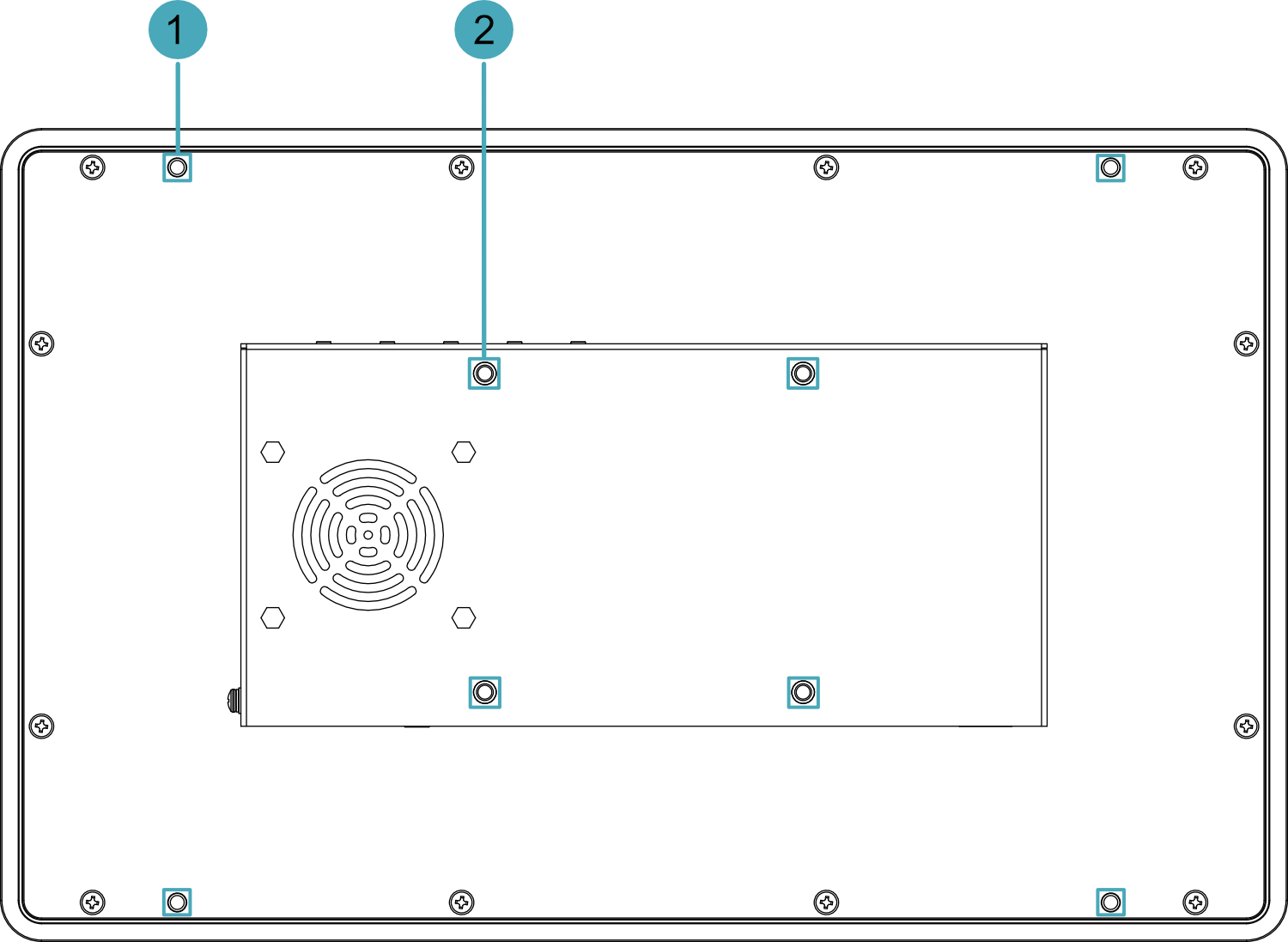
| NO. | Description |
|---|---|
| 1 | 4 x installation holes of snap, which are used to fix the snaps to the device for Embedded installation. |
| 2 | 4 x VESA mounting holes, reserved for VESA bracket installation. |
1.3.3 Side Panel
Introducing the types and definitions of the interfaces on the side panel.
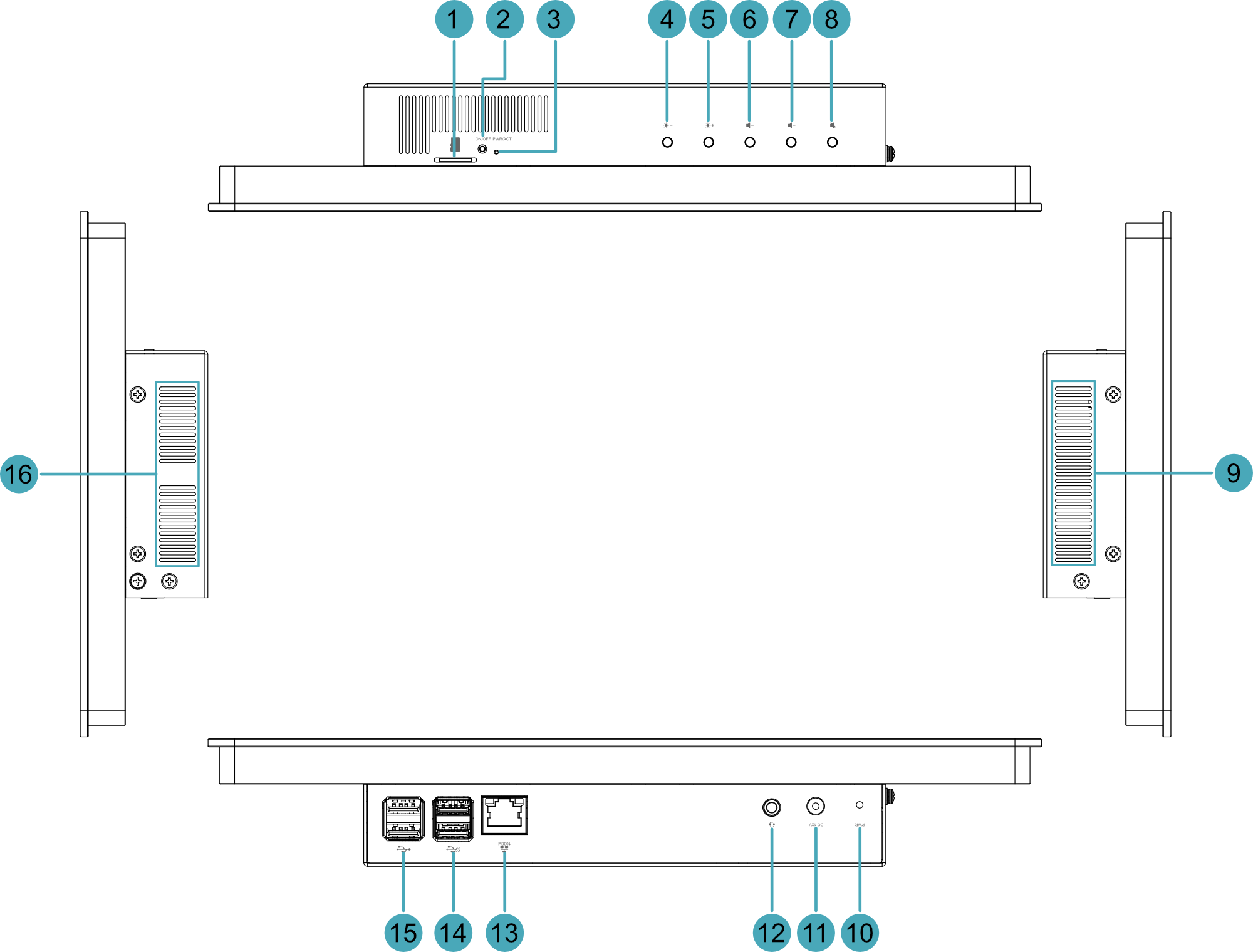
| NO. | Description |
|---|---|
| 1 | 1 x Micro SD card slot, pre-installed with a Micro SD card by default, used for system booting. |
| 2 | 1 x ON/OFF switch button, used for powering on and off the device. |
| 3 | 1 x PWR/ACT indicator, a dual-color (red/green) LED for monitoring power status and data access activity. |
| 4 | 1 x "Brightness –" button, press the button to decrease the backlight brightness of the LCD screen. |
| 5 | 1 x "Brightness +" button, press the button to increase the backlight brightness of the LCD screen. |
| 6 | 1 x "Volume -" button, press the button to decrease the output volume. |
| 7 | 1 x "Volume +" button, press the button to increase the output volume. |
| 8 | 1 x "Mute" button, press the button to mute the output audio. |
| 9 | Heat dissipation holes, which help improve cooling performance. |
| 10 | 1 x red power indicator, using to view the device's power-on and power-off status. |
| 11 | 1 x DC input, DC Jack connector, which supports 12V DC input. |
| 12 | 1 x 3.5mm stereo audio output jack, supports headphone connectivity. |
| 13 | 1 x Ethernet interface (10/100/1000M auto-negotiation), RJ45 connector, for Ethernet connectivity. |
| 14 | 2 x USB 3.0 ports, Type-A connectors, each supporting data transfer rates up to 5Gbps. |
| 15 | 2 x USB 2.0 ports, Type-A connectors, each supporting data transfer rates up to 480Mbps. |
| 16 | Heat dissipation holes, which help improve cooling performance. |
1.4 Button
The ED-HMI3010-116C device features 5 black buttons and 1 recessed button, comprising:
- 2 x Brightness adjustment buttons
- 3 x Volume adjustment buttons
- 1 x Power ON/OFF switch button
Silkscreen labels printed on the housing denote these functions as:  ,
,  ,
,  ,
,  ,
,  and "ON/OFF".
Brightness and Volume Adjustment Buttons
| Button | Description |
|---|---|
| Press the button to increase the backlight brightness of the LCD screen. |
| Press the button to decrease the backlight brightness of the LCD screen. |
| Press the button to increase the output volume. |
| Press the button to decrease the output volume. |
| Press the button to mute the output audio. |
ON/OFF Switch Button
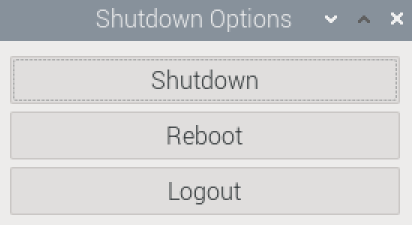
If you run Raspberry Pi Desktop, you can initiate a clean shutdown by briefly pressing the power button. A menu will appear asking whether you want to shutdown, reboot, or logout:
TIP:
If you run Raspberry Pi Desktop, you can press the power button twice in quick succession to shut down.
1.5 Indicator
Describe the various states and meanings of the indicators included in the ED-HMI3010-116C device.
| Indicator | Status | Description |
|---|---|---|
| PWR | On | The device has been powered on. |
| Blink | Power supply of the device is abnormal, please stop the power supply immediately. | |
| Off | The device is not powered on. | |
| PWR/ACT | On | The device has been powered on. |
| Blink | The system started successfully and is reading and writing data. | |
| Off | The device is not powered on. | |
| Yellow indicator of Ethernet port | On | The Ethernet connection is in the normal state. |
| Blink | The Ethernet connection is abnormal. | |
| Off | The Ethernet connection is not set up. | |
| Green indicator of Ethernet port | On | The Ethernet connection is in the normal state. |
| Blink | Data is being transmitted over the Ethernet port. | |
| Off | The Ethernet connection is not set up. |
1.6 Interface
Introducing the definitions and functions of each interface in the ED-HMI3010-116C.
1.6.1 Power Interface
ED-HMI3010-116C device includes 1 power input port with a DC Jack connector, labeled "DC 12V" on the housing. It supports 12V DC input.
TIP
A 12V 4A power adapter is recommended.
1.6.2 Audio Interface
ED-HMI3010-116C device includes 1 audio interface (3.5mm 4-pole headphone jack), labeled " " on the housing, supporting stereo audio output.
1.6.3 1000M Ethernet Interface
ED-HMI3010-116C device includes one adaptive 10/100/1000M Ethernet port, and the silkscreen is " ". The connector is RJ45, which is used to access to network. It is recommended to use the network cable of Cat6 and above. The pins definitions are as follows:
 | Pin ID | Pin Name |
|---|---|---|
| 1 | TX1+ | |
| 2 | TX1- | |
| 3 | TX2+ | |
| 4 | TX2- | |
| 5 | TX3+ | |
| 6 | TX3- | |
| 7 | TX4+ | |
| 8 | TX4- |
1.6.4 USB 2.0 Interface
The ED-HMI3010-116C device features 2 × USB 2.0 ports with standard Type-A connectors. These ports are silkscreen-labeled " " and support connection to standard USB 2.0 peripherals with a maximum data transfer rate of 480Mbps.
1.6.5 USB 3.0 Interface
The ED-HMI3010-116C device features 2 × USB 3.0 ports with standard Type-A connectors. These ports are silkscreen-labeled " " and support connection to standard USB 3.0 peripherals with a maximum data transfer rate of 5Gbps.