
Supercapacitor Safe Shutdown Issue
1 Overview
This section introduces the background and scope of the safe shutdown issue related to the use of supercapacitors in ED-IPC and ED-PAC products.
1.1 Background
- Working Principle of the Supercapacitor:
In our ED-IPC, and ED-PAC products, the supercapacitor is connected to the LVD pin of the extended GPIO chip on the PCBA. When the external power supply is disconnected, the LVD pin generates an interrupt signal. The CPU detects this interrupt signal and executes the /usr/sbin/lvd-callback.sh script. Users can customize the content of lvd-callback.sh to achieve desired functionality when the supercapacitor is triggered.
- Functionality of the Supercapacitor:
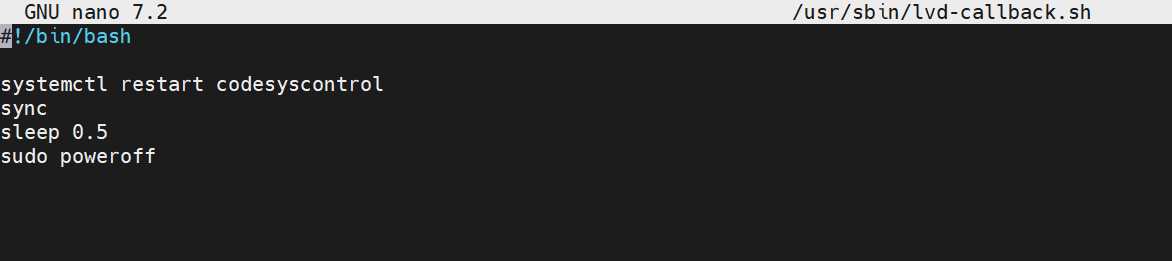
Our factory-default ED-IPC, and ED-PAC products equipped with supercapacitors come pre-installed with the ed-lvd software package. The default configuration of /usr/sbin/lvd-callback.sh is shown in the figure below. Its primary function is to use the sync command to save cached data before a safe shutdown.
- Phenomenon of the Supercapacitor Safe Shutdown Issue:
When users are normally using ED-IPC, and ED-PAC equipped with supercapacitors, if they encounter a sudden external power outage or manually disconnect the device power supply, the device will perform a safe shutdown. If the device power supply is plugged back in while the supercapacitor is not yet fully discharged (PWR light steady on), then the device remains in a shutdown state and cannot start normally. After the supercapacitor is fully discharged (PWR light off), plugging in the device power supply will allow the device to start normally.
1.2 Applicability
The supercapacitor safe shutdown issue involves the following products:
- ED-IPC2100 (versions with supercapacitor)
- ED-IPC2200 (versions with supercapacitor)
- ED-SBC2300 (versions with supercapacitor)
- ED-IPC2600 (versions with supercapacitor)
- ED-IPC3100 (versions with supercapacitor)
- ED-SBC3300 (versions with supercapacitor)
- ED-IPC3600 (versions with supercapacitor)
- ED-HMI2120 (versions with supercapacitor)
- ED-HMI2630 (versions with supercapacitor)
- ED-HMI3120 (versions with supercapacitor)
- ED-HMI3630 (versions with supercapacitor)
- ED-PAC3100 (with supercapacitor by default)
- ED-PAC3630 (with supercapacitor by default)
TIP
For the products mentioned above, if the manufacture date is after week 37 of 2025, the file /usr/sbin/lvd-callback.sh has been pre-deleted by default during factory shipment, and this issue does not exist.
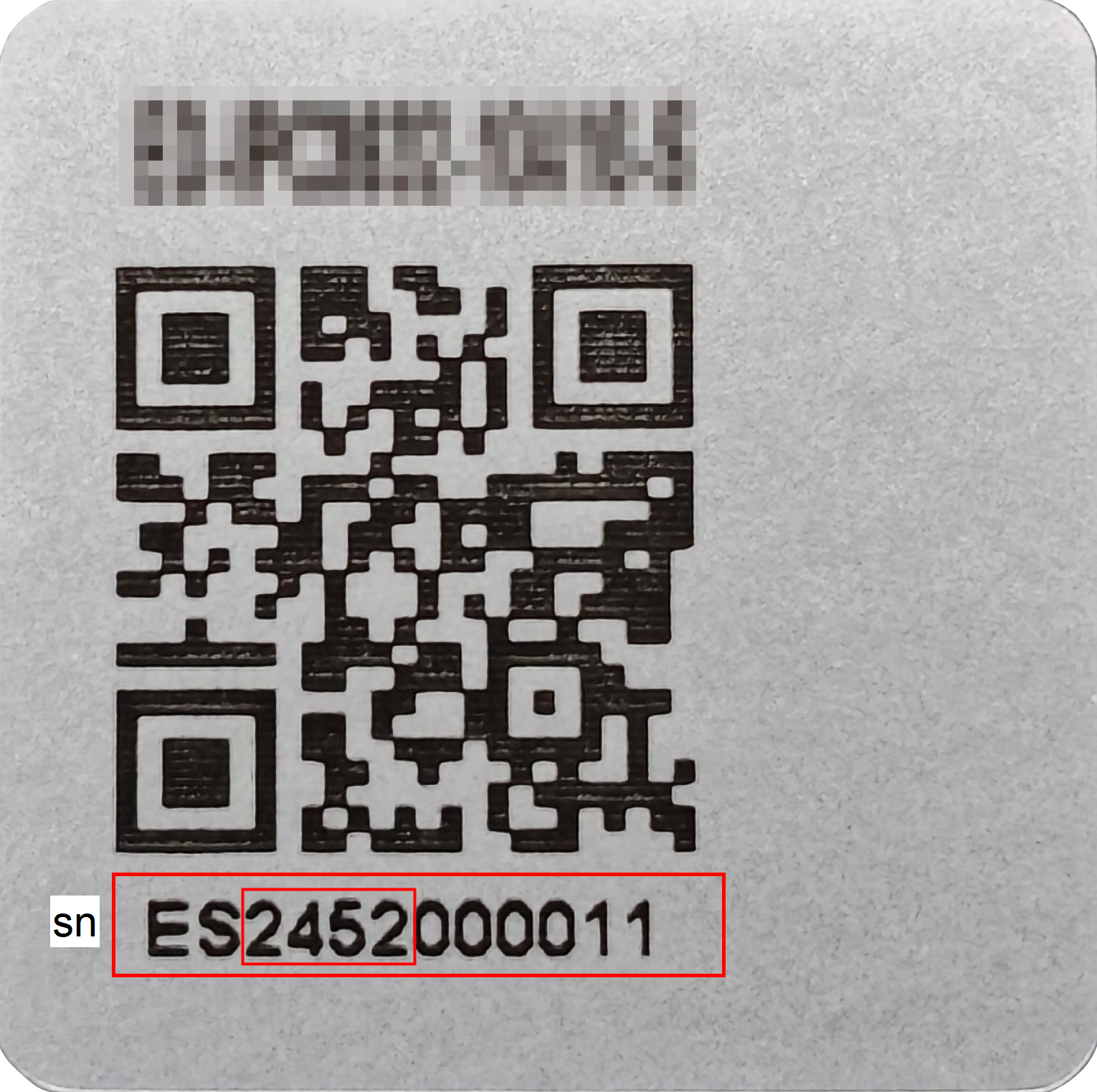
The device’s SN (Serial Number) label is typically located on the external casing. If the first four digits of the SN are greater than or equal to 2537, it indicates the device was manufactured during or after week 37 of 2025.
2 Solution
To address the above issue, our engineers have tested and validated the following two solutions. The specific steps are described below.
Preparation:
- The device had successfully booted into the system before the safe shutdown issue occurred.
- The device is equipped with a supercapacitor.
- The device is connected to Ethernet via Wi-Fi or an Ethernet port.
Steps:
Method 1 (Simple to perform, but the function of using sync to save cached data before shutdown will be lost):
WARNING
If the device runs CODESYS, this method cannot be used.
Disconnect the external power supply and wait approximately 3 minutes for the supercapacitor to fully discharge. Then, reconnect the power.
After the device boots normally, execute the following commands in the terminal to remove the
ed-lvdpackage:
sudo systemctl stop lvd-detect.service
sudo apt purge ed-lvd
TIP
After removing the ed-lvd package, the supercapacitor configuration will no longer take effect, preventing the device from failing to boot due to safe shutdown.
Method 2 (Allows for configuring other pre-shutdown functions in the future):
Disconnect the external power supply and wait approximately 3 minutes for the supercapacitor to fully discharge. Then, reconnect the power.
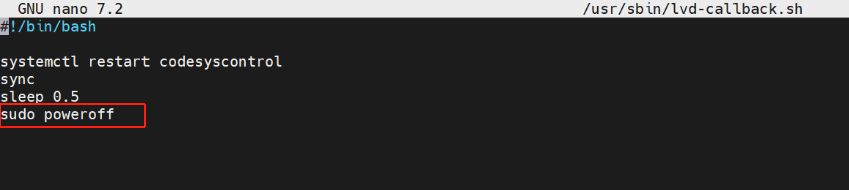
After the device boots normally, execute the following command in the terminal to enter the editing mode for
/usr/sbin/lvd-callback.shand delete the line containingsudo poweroff.
sudo nano /usr/sbin/lvd-callback.sh
Press
Ctrl+Oto save the file, then pressEnterto confirm, and finally pressCtrl+Xto exit the file.Execute the following command to reboot the device and apply the configuration.
sudo reboot
TIP
When the supercapacitor is triggered, the device will execute the commands in /usr/sbin/lvd-callback.sh sequentially. Users can customize the script content according to their needs.