
ED-IPC/ED-HMI Can Be Configured to Start via Reset Button After Soft Shutdown
1 Overview
Introduces the background and scope of application for configuring ED-IPC/ED-HMI devices to start via the Reset button after a soft shutdown.
1.1 Background
Some users reported that when using the ED-IPC3630 device, pressing the RESET button could not restart the device after a soft shutdown. Our engineers analyzed this issue and concluded: the CM5/Pi5 platform only supports the device resetting via the RESET button when it is in a running state; therefore, pressing the RESET button after a soft shutdown cannot restart the device.
To resolve this issue for our customers, our engineers conducted extensive operational verification and found that this problem can be solved by modifying the rpi-eeprom-config file.
TIP
Device soft shutdown includes the following two types:
- Executing the
sudo poweroffcommand. - In the Desktop system, selecting "shutdown" from the shutdown menu.
1.2 Scope of Application
This application applies to ED-IPC and ED-HMI products based on the CM5 and Pi5 platforms. The specific product models included are listed in the following table.
| Category | Product Models |
|---|---|
| ED-IPC | ED-IPC3100 ED-IPC3630 ED-IPC3020 |
| ED-HMI | ED-HMI3120-070C ED-HMI3120-101C ED-HMI3630-101C ED-HMI3020-070C ED-HMI3020-101C |
2 Application Guide
The following uses the ED-IPC3630 device as an example to introduce the specific operations for enabling the device to start via the RESET button after a soft shutdown by modifying the rpi-eeprom-config file.
Preparation:
- An ED-IPC3630 device capable of normal startup is prepared.
- The ED-IPC3630 device has started normally and is connected to the network.
Steps:
- Open a command window and execute the following command to open the
rpi-eeprom-configfile.
sudo -E rpi-eeprom-config --edit

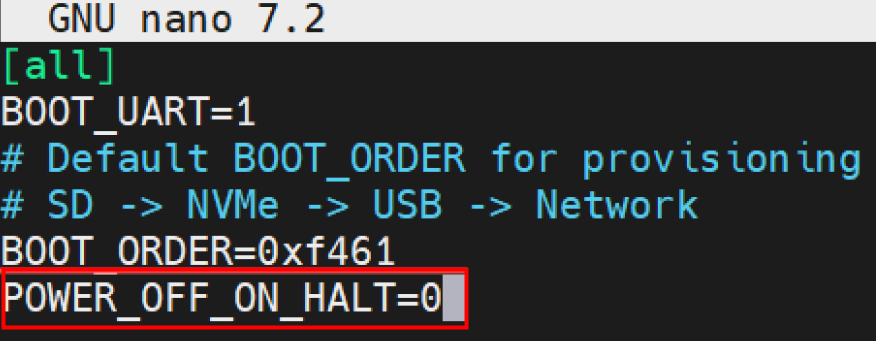
- Add "POWER_OFF_ON_HALT=0" at the end of the file.
- Press
Ctrl+Oto save the file, then press Enter, and finally pressCtrl+Xto exit the file editing mode. Wait for the file update to succeed.

- Execute the following command to restart the device for the configuration to take effect.
sudo reboot