Install Device Description Package and Creat A new Project on ED-PLC2010
Document Notes
Current Version: A
Revision History
| Version | Description | Date |
|---|---|---|
| A | Initial version | 2025.08.12 |
1 Overview
Introduction to the background and applicable scope of installing Device Description File packages and creating new projects for ED-PLC2010.
1.1 Background
Before programming ED-PLC2010 device via CODESYS, the corresponding device description files must be pre-installed in the CODESYS development environment. Since ED-PLC2010 supports the expansion of local I/O modules, the installation process requires separate deployment of device description files for both the ED-PLC2010 controller itself and the related I/O modules. Users unfamiliar with the product may overlook installing the I/O module files, resulting in abnormal device functionality. To address this issue, our company has introduced an integrated device description package (containing the necessary files for ED-PLC2010, I/O modules, and multiple licenses). Users only need to install this package once to complete the deployment of all description files, effectively preventing file omissions, ensuring smooth device operation, and simplifying the workflow.
1.2 Applicability
This guide applies to ED-PLC2010.
2 Configuration Guide
Describes the specific operations for installing the integrated device description package and creating a new project.
Preparation:
- One PC equipped with CODESYS software version V3.5 SP19 (64-bit) or higher has been prepared and is properly connected to the network.
- The PC’s IP address is set to the same subnet as the device’s IP, and both are connected to the CODESYS network.
- Connection between the ED-PLC2010 device, coupler, and I/O modules has been completed.
Steps:
Download the integrated device description package from: EDATEC_BASE File Package.
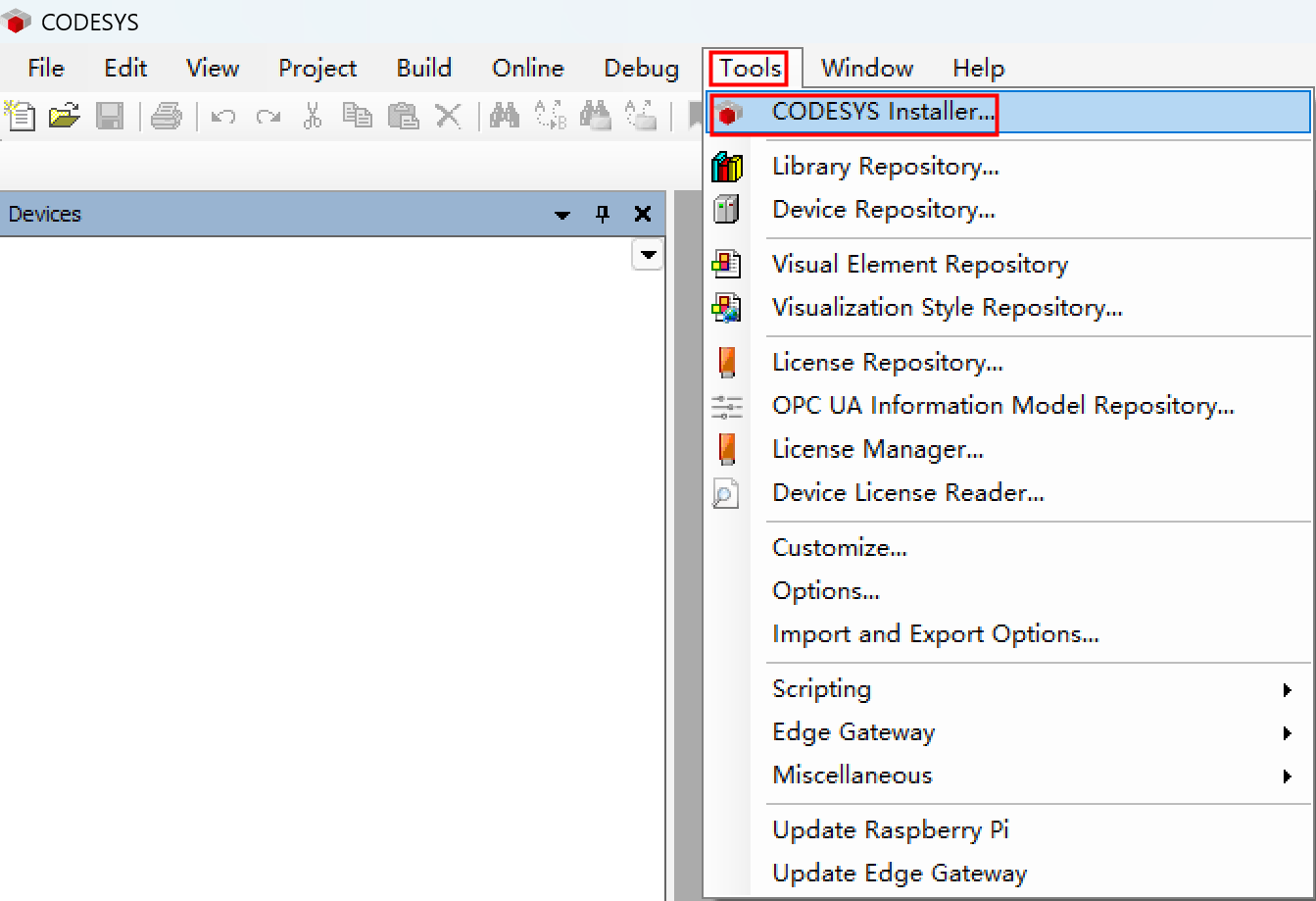
Click the CODESYS icon on the PC desktop and Run as Administrator. Select "Tools" → "CODESYS Installer" from the menu bar.
- In the "CODESYS Installer" window, click "Install File".
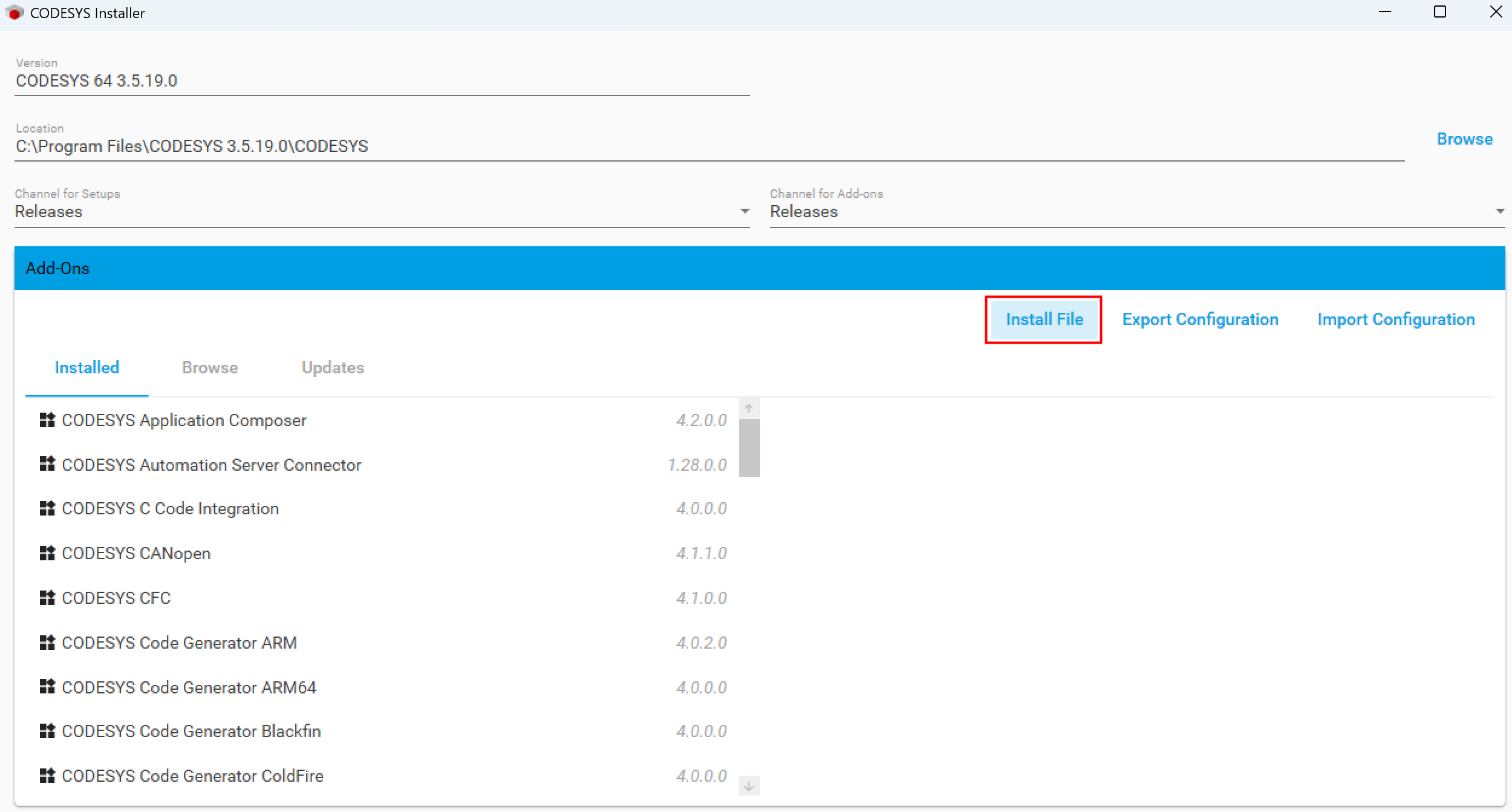
Select the device description package downloaded in Step 1 ('EDATEC_BASE_Vx.x.x.x.package' file) at the specified path, then click 'Open' to install.
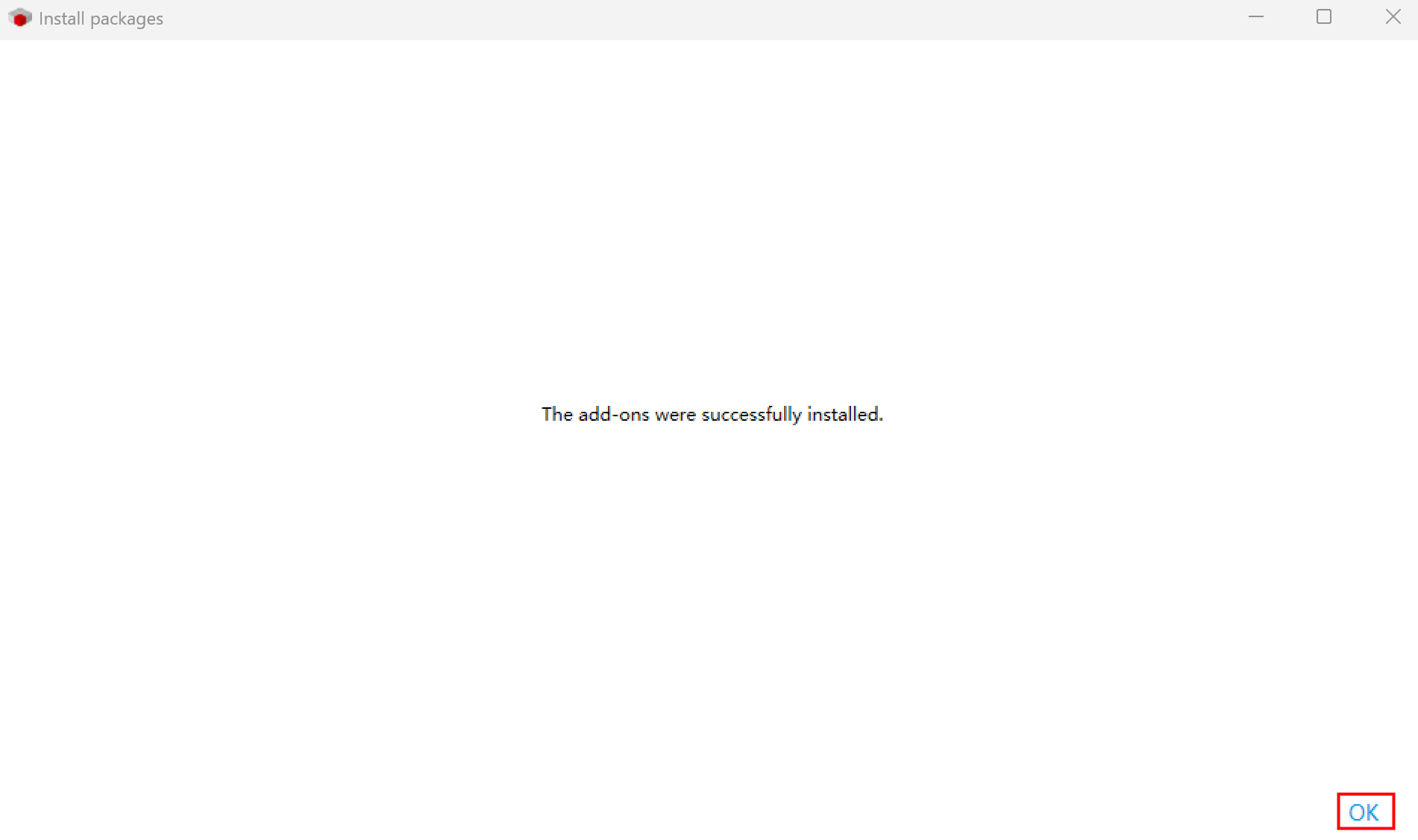
Follow the on-screen prompts to complete installation. Click "OK" in the success dialog.
TIP
Close the main CODESYS interface during installation.
- Verify the installed device description package.
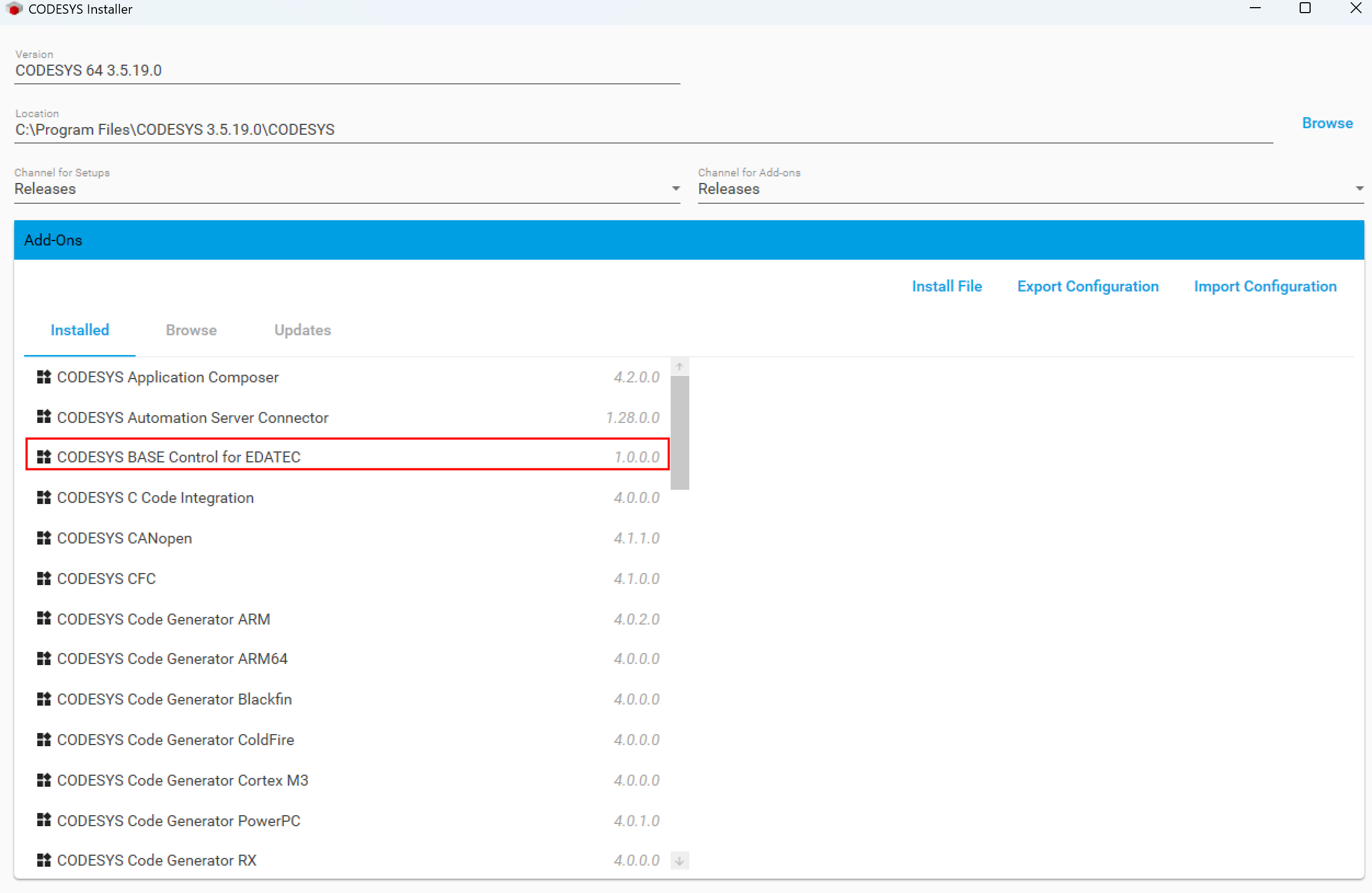
- If "CODESYS BASE Control for EDATEC" appears as shown above, the installation is successful.
- If not, reinstall the package.
TIP
To uninstall: Select "CODESYS BASE Control for EDATEC" and click Uninstall. Please Close the main CODESYS interface during uninstallation process.
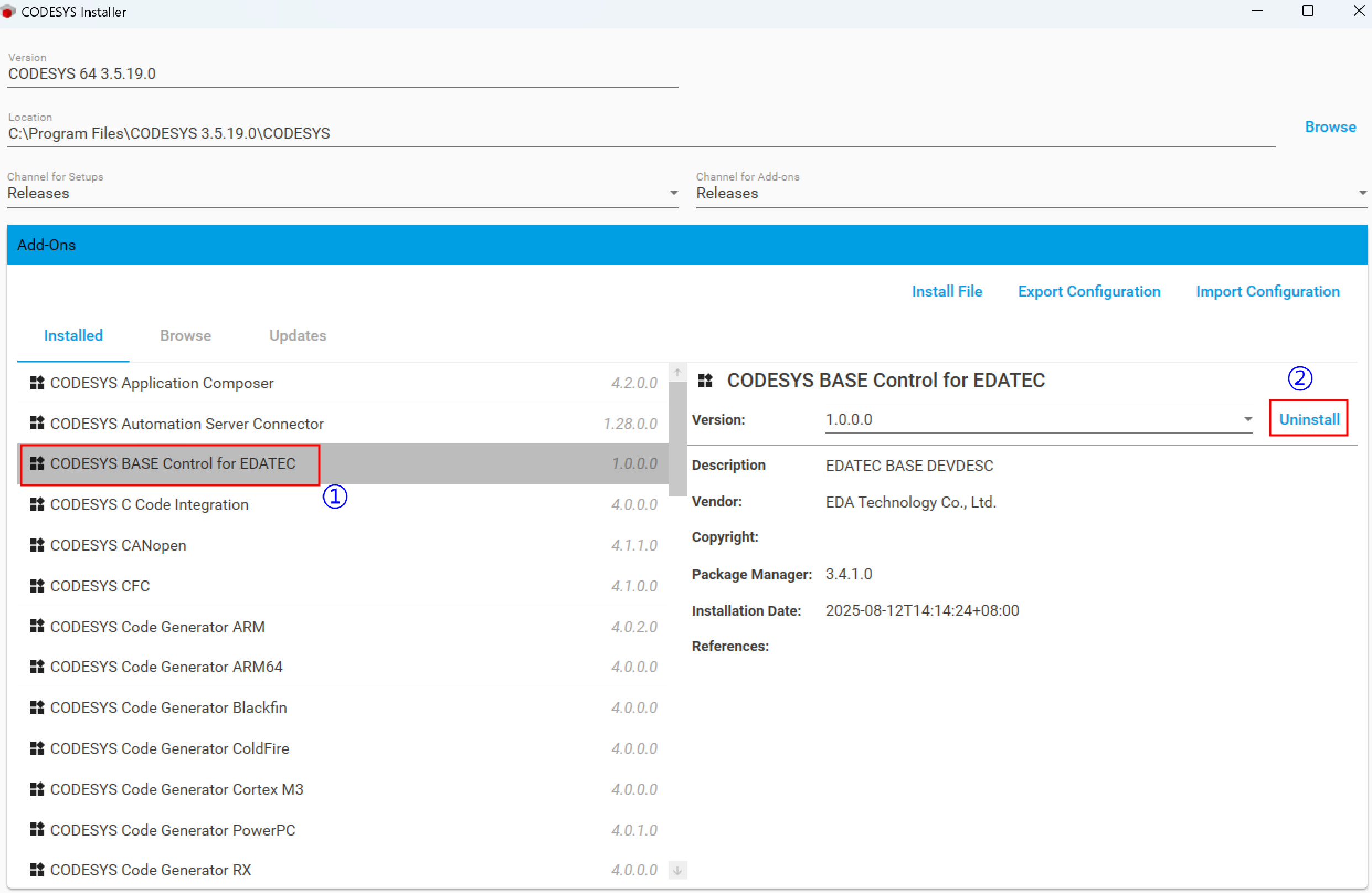
Close the "CODESYS Installer" window.
Double-click the CODESYS desktop icon to launch the software. Select "Tools" → "Device Repository" from the menu bar.
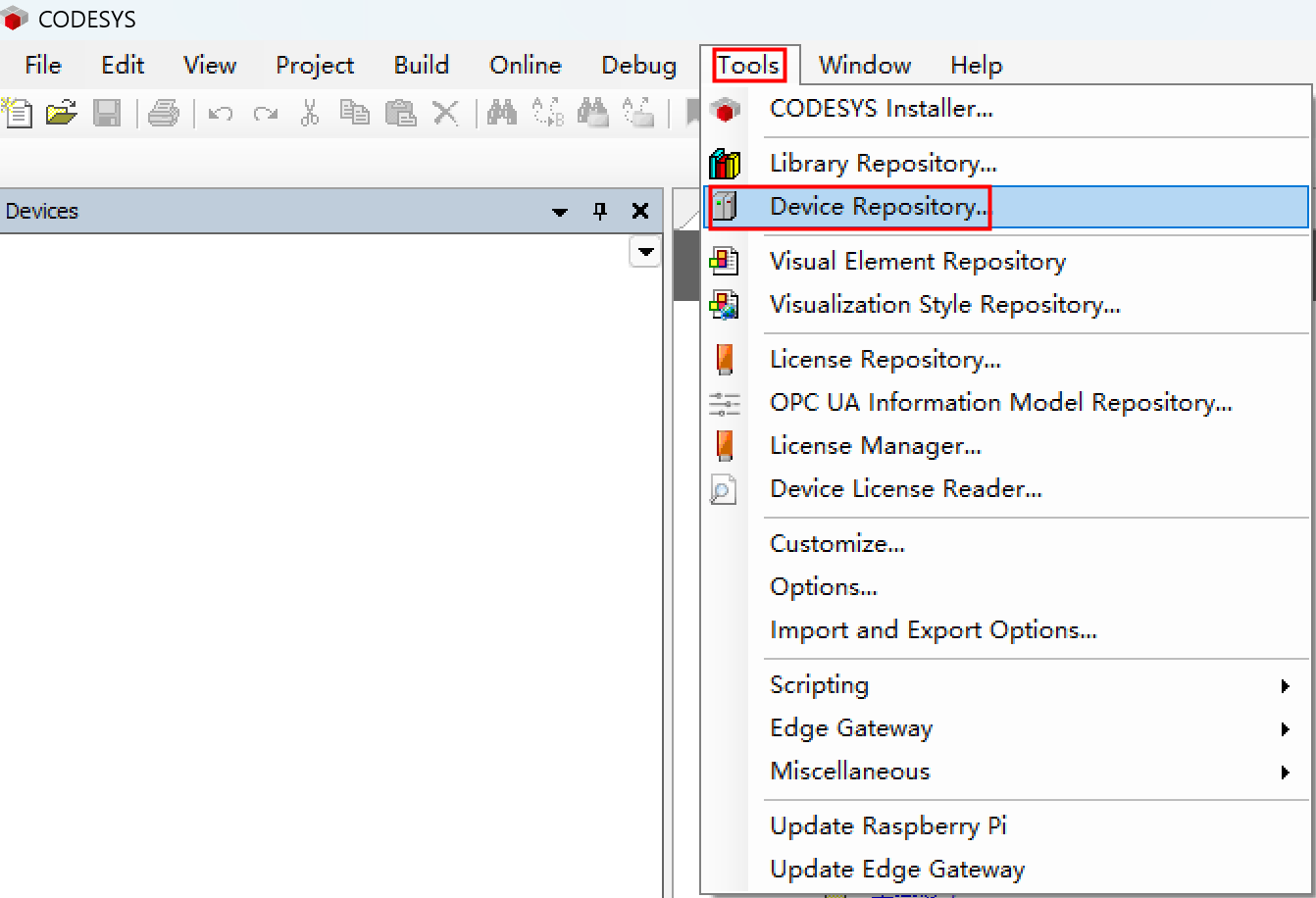
- View the installed device description files in the "Device Repository" window.
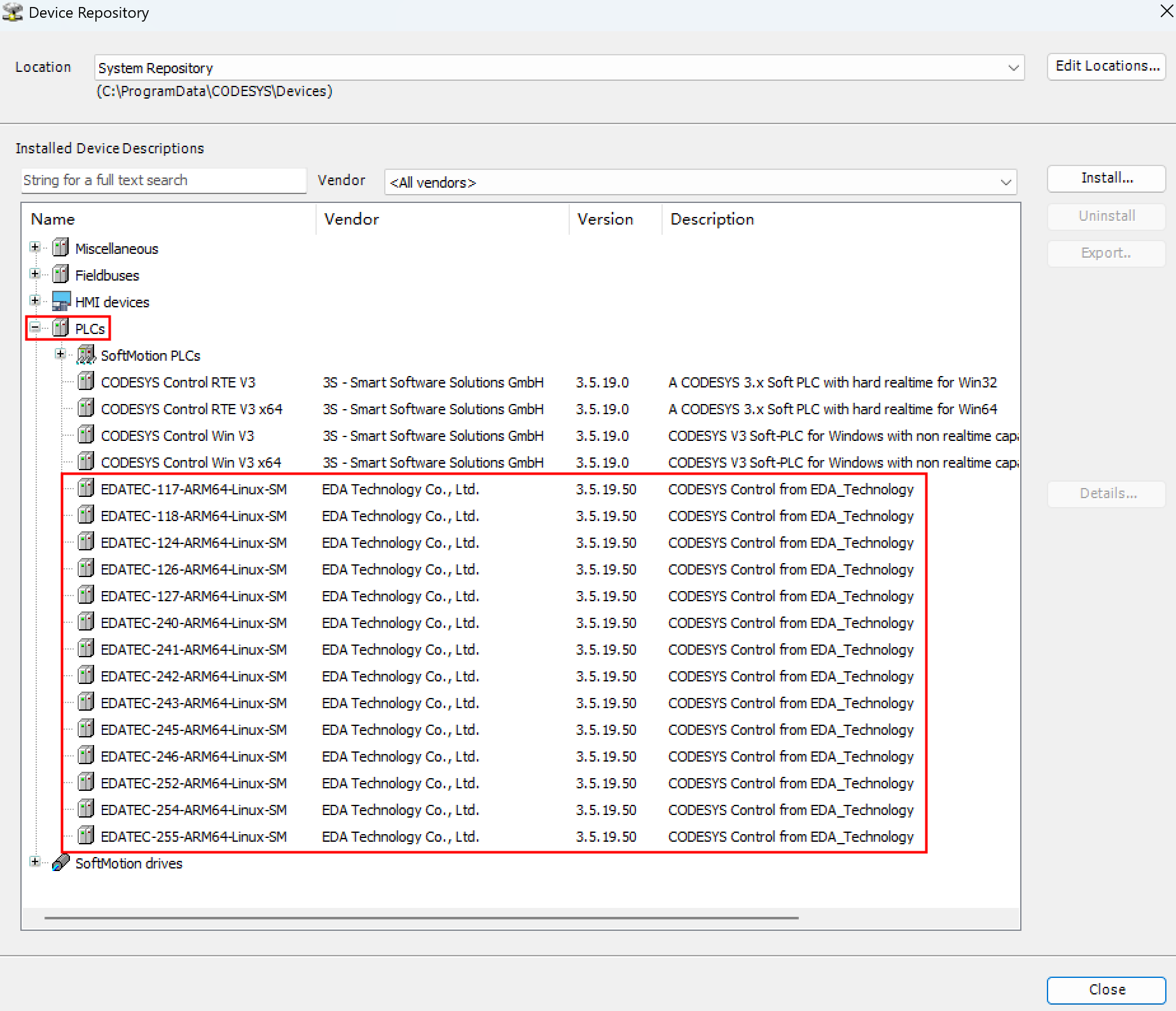
Close the "Device Repository" window.
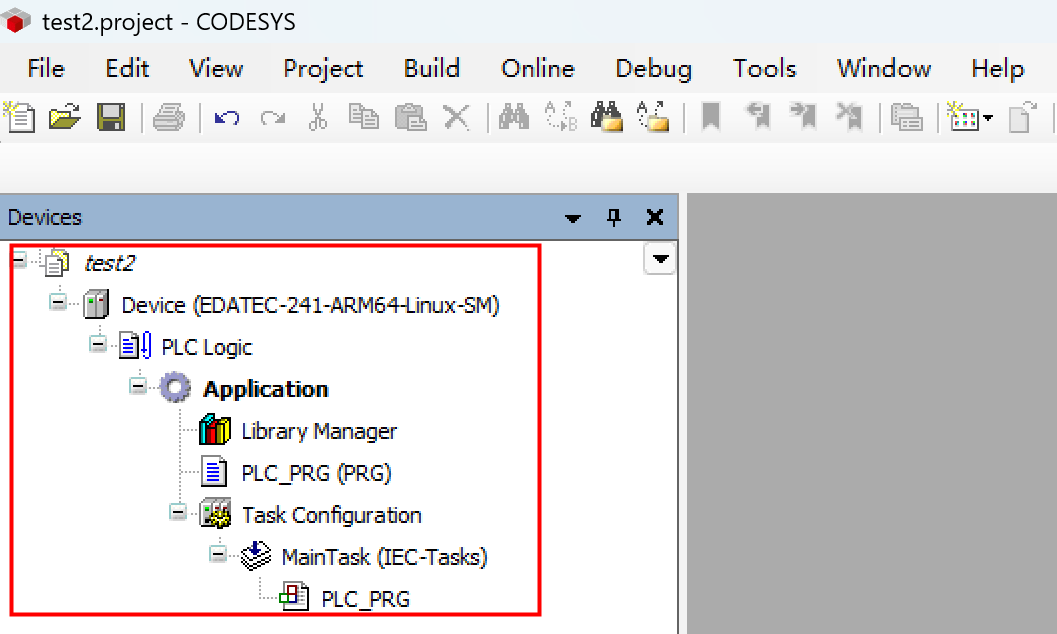
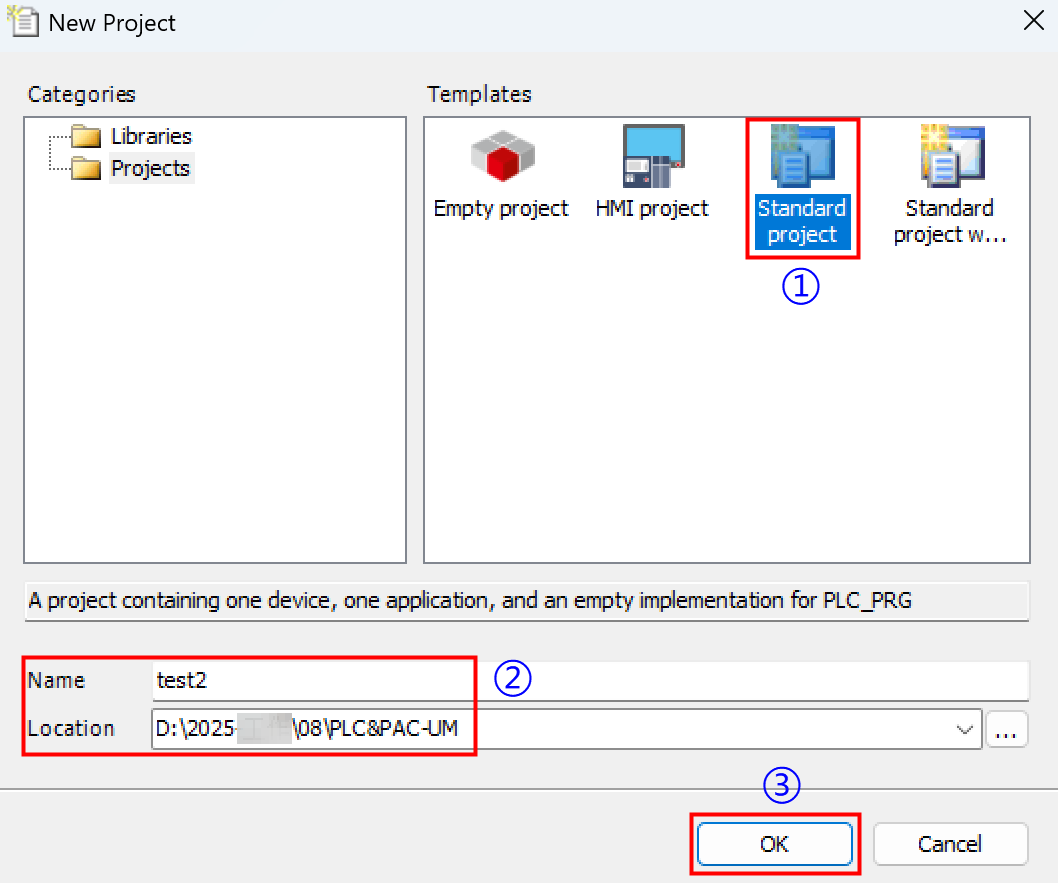
Select "File" → "New Project" from the menu bar to create a standard project.
- Select the installed device description file according to the actual device license type (see table below), then Click "OK".
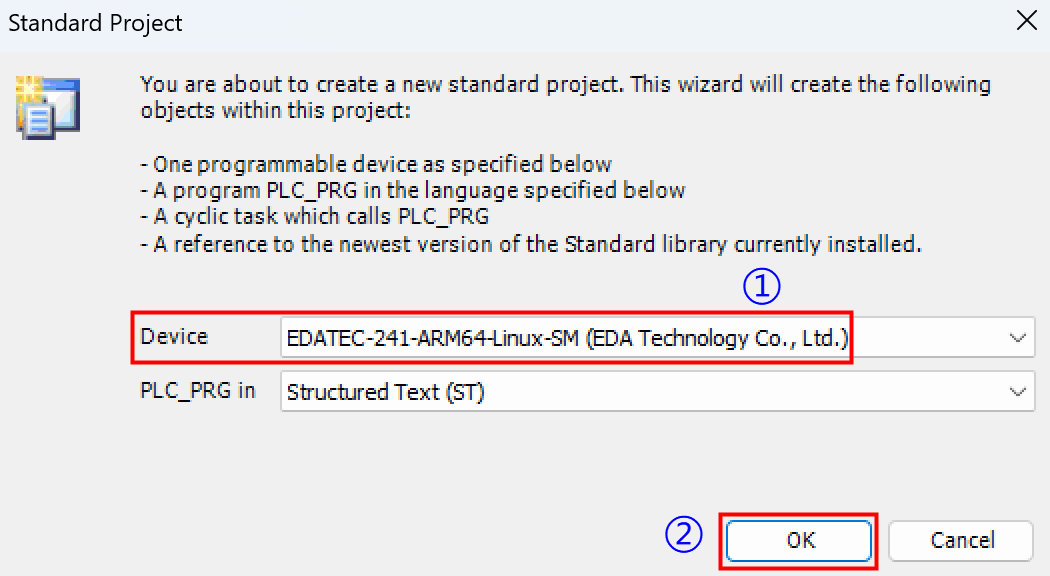
| Ordering Code*1 | Function Number | Device File Name | Description | Remarks |
|---|---|---|---|---|
| ED-CODESYS-MC | 128 | EDATEC-128-ARM64-Linux-SM.devdesc.xml | EtherCAT Master, Modbus TCP Master, OPC UA Server, CANopen Manager, Modbus Serial Master, PROFINET Controller, Multicore 4 Cores | Release date: 2025-11-20 |
| ED-CODESYS-TV-MC | 129 | EDATEC-129-ARM64-Linux-SM.devdesc.xml | EtherCAT Master, Modbus TCP Master, OPC UA Server, CANopen Manager, Modbus Serial Master, PROFINET Controller, TargetVisu, Multicore 4 Cores | Release date: 2025-11-20 |
| ED-CODESYS-WV-MC | 130 | EDATEC-130-ARM64-Linux-SM.devdesc.xml | EtherCAT Master, Modbus TCP Master, OPC UA Server, CANopen Manager, Modbus Serial Master, PROFINET Controller, WebVisu, Multicore 4 Cores | Release date: 2025-11-20 |
| ED-CODESYS-TV-WV-MC | 131 | EDATEC-131-ARM64-Linux-SM.devdesc.xml | EtherCAT Master, Modbus TCP Master, OPC UA Server, CANopen Manager, Modbus Serial Master, PROFINET Controller, TargetVisu, WebVisu, Multicore 4 Cores | Release date: 2025-11-20 |
| ED-CODESYS-TV-WV-SM-CNC-MC | 143 | EDATEC-143-ARM64-Linux-SM.devdesc.xml | EtherCAT Master, Modbus TCP Master, OPC UA Server, CANopen Manager, Modbus Serial Master, PROFINET Controller, TargetVisu, WebVisu, Softmotion, CNC, Multicore 4 Cores | Release date: 2025-11-20 |
| ED-CODESYS-TV-SM-SC | 117 | EDATEC-117-ARM64-Linux-SM.devdesc.xml | EtherCAT Master, Modbus TCP Master, OPC UA Server, TargetVisu, Softmotion, Single Core | Discontinuation date: 2025-06-27 |
| ED-CODESYS-WV-SM-SC | 118 | EDATEC-118-ARM64-Linux-SM.devdesc.xml | EtherCAT Master, Modbus TCP Master, OPC UA Server, WebVisu, Softmotion, Single Core | Discontinuation date: 2025-06-27 |
| ED-CODESYS-SM-CNC-SC | 124 | EDATEC-124-ARM64-Linux-SM.devdesc.xml | EtherCAT Master, Modbus TCP Master, OPC UA Server, Softmotion, CNC, Single Core | Discontinuation date: 2025-06-27 |
| ED-CODESYS-WV-SM-CNC-SC | 126 | EDATEC-126-ARM64-Linux-SM.devdesc.xml | EtherCAT Master, Modbus TCP Master, OPC UA Server, WebVisu, Softmotion, CNC, Single Core | Discontinuation date: 2025-06-27 |
| ED-CODESYS-TV-WV-SM-CNC-SC | 127 | EDATEC-127-ARM64-Linux-SM.devdesc.xml | EtherCAT Master, Modbus TCP Master, OPC UA Server, TargetVisu, WebVisu, Softmotion, CNC, Single Core | Discontinuation date: 2025-06-27 |
| ED-CODESYS-MC | 240 | EDATEC-240-ARM64-Linux-SM.devdesc.xml | EtherCAT Master, Modbus TCP Master, OPC UA Server, Multicore 4 Cores | Upgraded to function number 128 on 2025-11-20, with the order code remaining unchanged. |
| ED-CODESYS-TV-MC | 241 | EDATEC-241-ARM64-Linux-SM.devdesc.xml | EtherCAT Master, Modbus TCP Master, OPC UA Server, TargetVisu, Multicore 4 Cores | Upgraded to function number 129 on 2025-11-20, with the order code remaining unchanged. |
| ED-CODESYS-WV-MC | 242 | EDATEC-242-ARM64-Linux-SM.devdesc.xml | EtherCAT Master, Modbus TCP Master, OPC UA Server, WebVisu, Multicore 4 Cores | Upgraded to function number 130 on 2025-11-20, with the order code remaining unchanged. |
| ED-CODESYS-TV-WV-MC | 243 | EDATEC-243-ARM64-Linux-SM.devdesc.xml | EtherCAT Master, Modbus TCP Master, OPC UA Server, TargetVisu, WebVisu, Multicore 4 Cores | Upgraded to function number 131 on 2025-11-20, with the order code remaining unchanged. |
| ED-CODESYS-TV-SM-MC | 245 | EDATEC-245-ARM64-Linux-SM.devdesc.xml | EtherCAT Master, Modbus TCP Master, OPC UA Server, TargetVisu, Softmotion, Multicore 4 Cores | Discontinuation date: 2025-11-20 |
| ED-CODESYS-WV-SM-MC | 246 | EDATEC-246-ARM64-Linux-SM.devdesc.xml | EtherCAT Master, Modbus TCP Master, OPC UA Server, WebVisu, Softmotion, Multicore 4 Cores | Discontinuation date: 2025-11-20 |
| ED-CODESYS-SM-CNC-MC | 252 | EDATEC-252-ARM64-Linux-SM.devdesc.xml | EtherCAT Master, Modbus TCP Master, OPC UA Server, Softmotion, CNC, Multicore 4 Cores | Discontinuation date: 2025-11-20 |
| ED-CODESYS-WV-SM-CNC-MC | 254 | EDATEC-254-ARM64-Linux-SM.devdesc.xml | EtherCAT Master, Modbus TCP Master, OPC UA Server, WebVisu, Softmotion, CNC, Multicore 4 Cores | Discontinuation date: 2025-11-20 |
| ED-CODESYS-TV-WV-SM-CNC-MC | 255 | EDATEC-255-ARM64-Linux-SM.devdesc.xml | EtherCAT Master, Modbus TCP Master, OPC UA Server, TargetVisu, WebVisu, Softmotion, CNC, Multicore 4 Cores | Upgraded to function number 143 on 2025-11-20, with the order code remaining unchanged. |
| *1: On November 24, 2025, the following products will add support for the CANopen Manager, Modbus Serial Master, and PROFINET Controller buses: ED-CODESYS-MC, ED-CODESYS-TV-MC, ED-CODESYS-WV-MC, ED-CODESYS-TV-WV-MC, and ED-CODESYS-TV-WV-SM-CNC-MC. Their corresponding function numbers will be upgraded to 128, 129, 130, 131, and 143, respectively, while the order codes remain unchanged. | ||||
- View the created standard project as shown in the figure below.