
Supercapacitor Usage Guide
Notes
Current Version: B
Revision History
| Version | Description | Date |
|---|---|---|
| B | Corresponding software version: ed-lvd_1.20260106.3_all.deb
| 2026.01.28 |
| A | Initial Version | 2025.08.28 |
1 Overview
This section introduces the background and scope of application for configuring and using supercapacitors in products such as the ED-IPC and ED-HMI series.
1.1 Background
Some users who purchase products with supercapacitors want to understand how they work and further explore advanced applications, such as saving cached data after a power loss. In response to these needs, we have provided corresponding software. Users can install the software package themselves and modify scripts to enable operations like save cached data when the device loses power.
1.2 Application Scope
This application applies to ED-IPC2100, ED-IPC2200, ED-SBC2300, ED-IPC2600, ED-IPC3100, ED-SBC3300, ED-IPC3600, ED-HMI2120, ED-HMI2630, ED-HMI3120, ED-HMI3630, and other products.
2 Application Guide
Introduces how supercapacitors work and the specifics of configuring and using them.
2.1 Working Principle
The supercapacitor is connected to the LVD pin of the extended GPIO chip in the PCBA. When the external power supply of the device is disconnected, an interrupt signal will be generated at the LVD pin, and the CPU will execute the /usr/sbin/lvd-callback.sh script after detecting the interrupt signal. Users can customise the content of lvd-callback.sh to make the supercapacitor achieve the desired function when triggered.
2.2 Safe Shutdown
After the supercapacitor is fully charged, if the power adapter is disconnected:
- ED-IPC will continue to operate normally until the supercapacitor is depleted, at which point it will automatically shut down.
- ED-HMI will automatically turn off the screen backlight and reduce the CPU frequency to save power. The device will remain in a low-power operating state until the supercapacitor is depleted, after which it will automatically shut down.
2.3 Configuring Supercapacitor Parameters
If a user needs to implement a specific function (such as saving data) during the brief period when the supercapacitor is active, the function to be implemented (custom code) can be written in advance into lvd-callback.sh. The function will then be automatically executed when the supercapacitor is in operation. The configuration process is illustrated below using ED-HMI3120-070C as an example.
Preparation:
- The device has booted into the system normally.
- The device has a supercapacitor.
- The device is connected to the Ethernet via Wi-Fi or its Ethernet port.
Steps:
- Open the terminal window on the device and execute the following commands in sequence to add the APT repository.
curl -sS https://apt.edatec.cn/pubkey.gpg | sudo apt-key add -
echo "deb https://apt.edatec.cn/raspbian stable main" | sudo tee /etc/apt/sources.list.d/edatec.list
sudo apt update
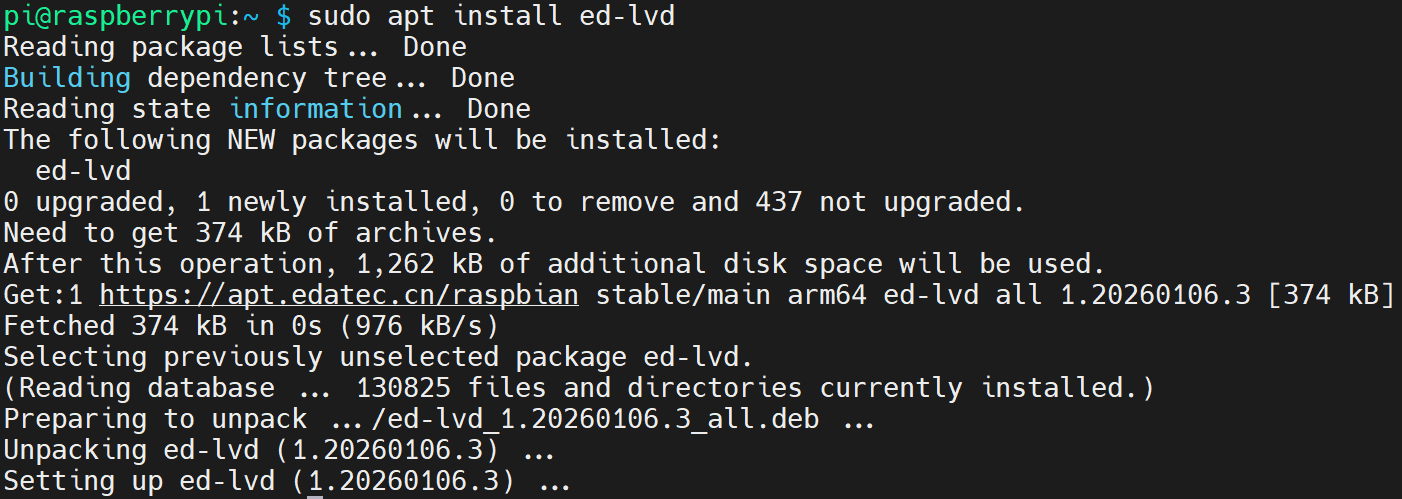
- Execute the following command to install the
ed-lvdsoftware package.
sudo apt install ed-lvd
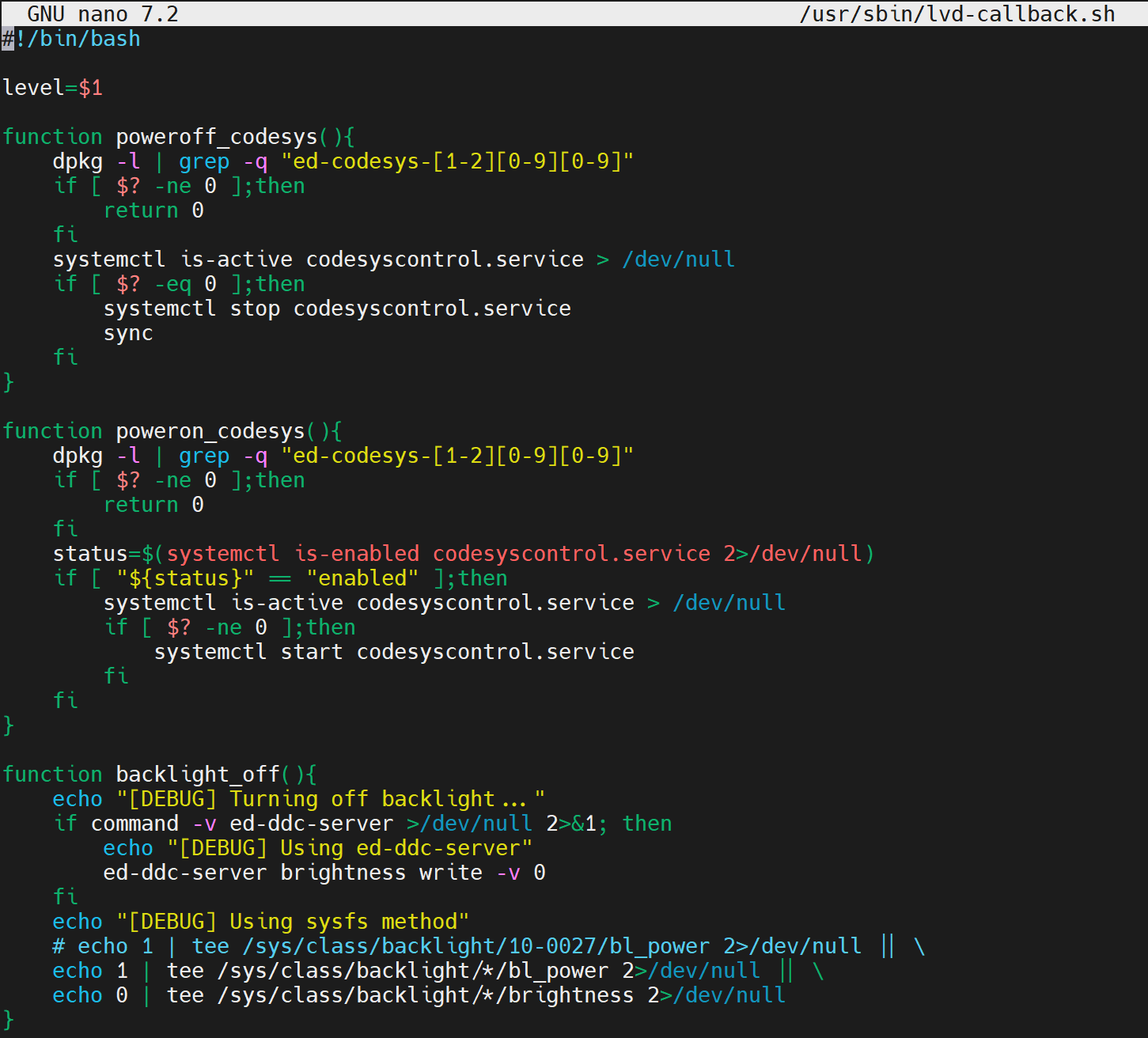
- Execute the following command to open the
lvd-callback.shscript file.
sudo nano /usr/sbin/lvd-callback.sh
TIP
- The image above shows the default configuration of the
lvd-callback.shscript for the ED-HMI3120-070C device. - It is recommended to back up the current script file before making any modifications.
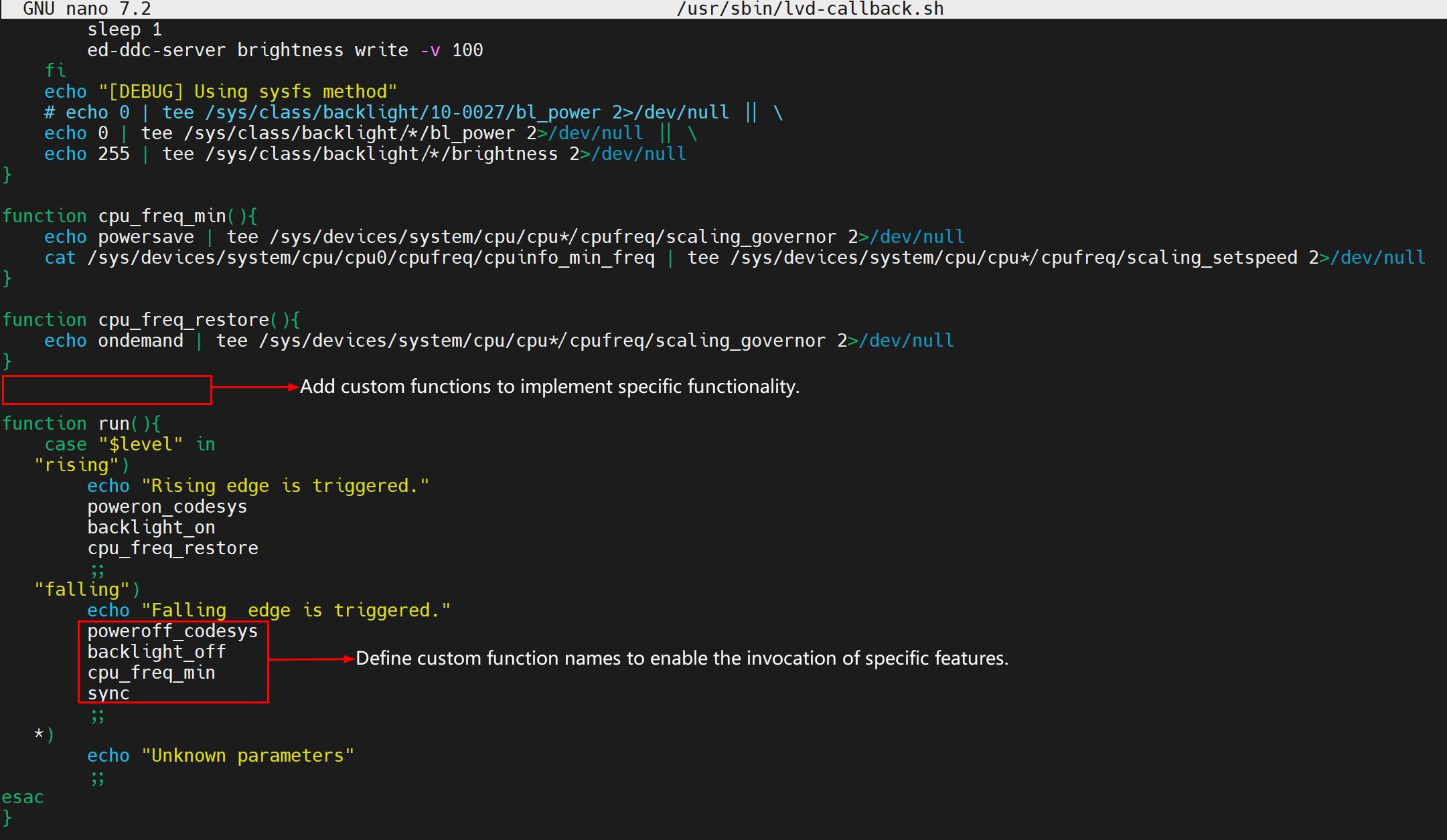
- Customize the script file as needed by adding custom function to implement user-specific functionality.
TIP
When the supercapacitor is triggered, the device will execute the commands in lvd-callback.sh sequentially.
Press
Ctrl+oto save the file, followed byEnter, and then pressCtrl+xto exit the file editing mode.Execute the following command to see if
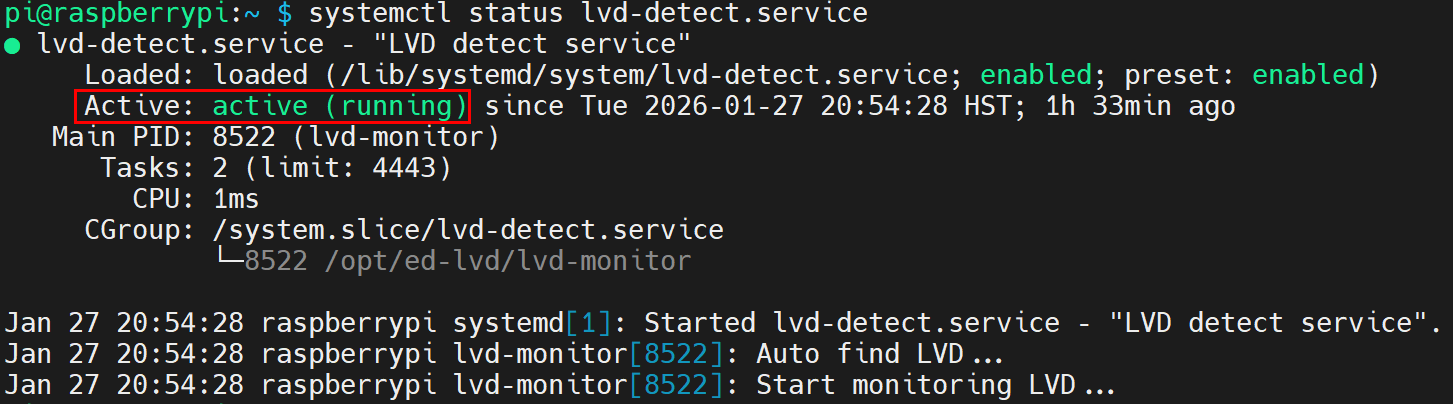
lvd-detect.serviceis running(Runs automatically by default).
sudo systemctl status lvd-detect.service
As shown in the image below, if the information in the indicated part of the return message is "Active: active (running)," it means that the lvd-detect.service is running.
- Disconnect the power adapter, and the device will automatically execute the
lvd-callback.shscript to perform the user-defined functions.