
1 Hardware Manual
This chapter introduces the product overview, packing list, appearance, buttons, indicators, and interfaces.
1.1 Overview
The ED-MONITOR-133C is a 13.3-inch industrial touch monitor featuring a screen resolution of 1920x1080, a high brightness of 450 cd/m², and a multi-touch capacitive touch screen. It includes one standard HDMI interface, one Type-C USB port, one DC Jack power interface, and one 3.5mm audio jack, making it compatible with various general-purpose PC hosts. The backlight and volume can be adjusted via buttons and software, and it is primarily used in industrial control applications.
- The HDMI interface allows direct connection to the HDMI output of a PC host.
- The Type-C USB port transmits touch screen signals.
- The 3.5mm audio jack supports headphone connectivity.
- The DC Jack power interface supports 12V~24V DC input.

1.2 Packing List
- 1 x ED-MONITOR-133C Monitor
- 1 x Mounting Kit (including 4 x buckles, 4xM4*10 screws and 4xM4*16 screws)
1.3 Appearance
This section introduces the functions and definitions of the interfaces on each panel.
1.3.1 Front Panel
Introducing the types and definitions of the interfaces on the front panel.

| NO. | Description |
|---|---|
| 1 | 1 × LCD screen, 13.3-inch touch screen with a resolution of 1920x1080, multi-touch capacitive touch screen. |
1.3.2 Rear Panel
Introducing the types and definitions of the interfaces on the rear panel.
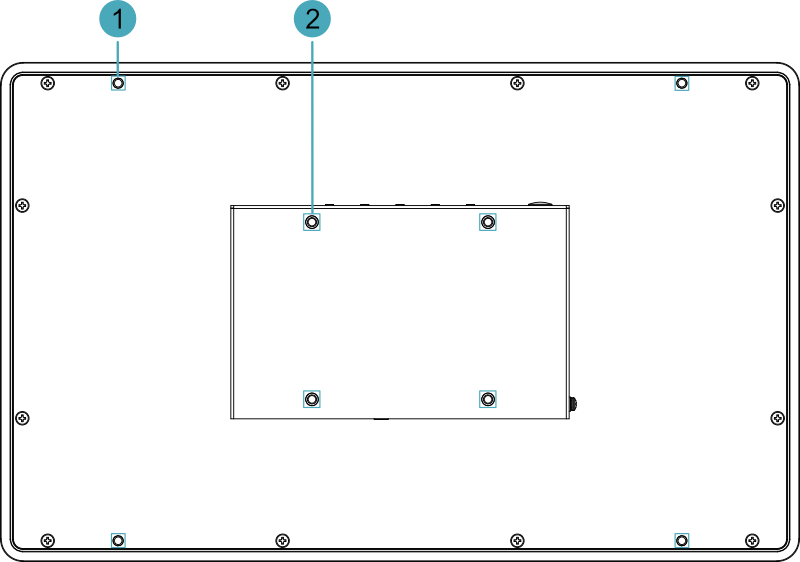
| NO. | Description |
|---|---|
| 1 | 4 x installation holes of snap, which are used to fix the snaps to the device for installation. |
| 2 | 4 x VESA mounting holes, reserved for VESA bracket installation. |
1.3.3 Side Panel
Introducing the types and definitions of the interfaces on the side panel.
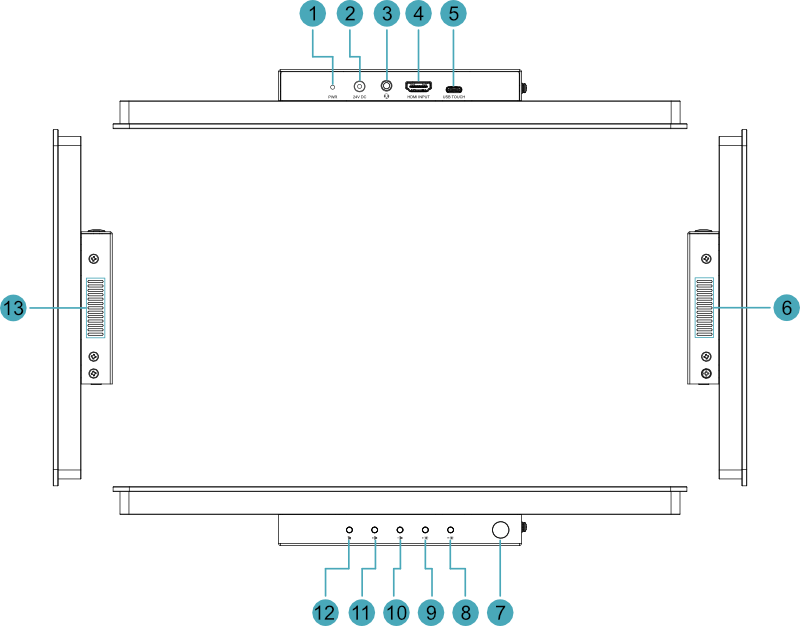
| NO. | Description |
|---|---|
| 1 | 1 x red power indicator, using to view the device's power-on and power-off status. |
| 2 | 1 x DC input, DC Jack connector, which supports 12V~24V DC input. |
| 3 | 1 x 3.5mm stereo audio output jack, supports headphone connectivity. |
| 4 | 1 x HDMI input, Type-A connector, which connects to the HDMI output of a PC host. |
| 5 | 1 x USB touch screen port, Type-C USB connector, which connects to the USB port of a PC host to transmit touch screen signals. |
| 6 | Heat dissipation holes, which help improve cooling performance. |
| 7 | 1 x Rubber plug (pre-drilled 7mm diameter circular cable routing hole), designed to accommodate additional cable management needs. |
| 8 | 1 x "Brightness –" button, press the button to decrease the backlight brightness of the LCD screen. |
| 9 | 1 x "Brightness +" button, press the button to increase the backlight brightness of the LCD screen. |
| 10 | 1 x "Volume -" button, press the button to decrease the output volume. |
| 11 | 1 x "Volume +" button, press the button to increase the output volume. |
| 12 | 1 x "Mute" button, press the button to mute the output audio. |
| 13 | Heat dissipation holes, which help improve cooling performance. |
1.4 Button
ED-MONITOR-133C device includes two backlight brightness adjustment buttons and three volume adjustment buttons. The buttons are black in color and marked with screen-printed labels  ,
,  ,
,  ,
,  and
and  on the housing.
| Button | Description |
|---|---|
| Press the button to increase the backlight brightness of the LCD screen. |
| Press the button to decrease the backlight brightness of the LCD screen. |
| Press the button to increase the output volume. |
| Press the button to decrease the output volume. |
| Press the button to mute the output audio. |
1.5 Indicator
ED-MONITOR-133C device includes a red power indicator, marked with the screen-printed label "PWR" on the housing.
| Indicator | Status | Description |
|---|---|---|
| PWR | On | The device has been powered on. |
| Blink | Power supply of the device is abnormal, please stop the power supply immediately. | |
| Off | The device is not powered on. |
1.6 Interface
Introducing the definitions and functions of each interface in the ED-MONITOR-133C.
1.6.1 Power Interface
The ED-MONITOR-133C device includes 1 power input port with a DC Jack connector, labeled "24V DC" on the housing. It supports 12V~24V DC input.
TIP
A 12V 4A power adapter is recommended.
1.6.2 HDMI Interface
ED-MONITOR-133C device includes 1 HDMI input interface with a Type-A connector, labeled "HDMI INPUT" on the housing, used to connect to the HDMI output of a PC host.
1.6.3 Type-C USB Interface
ED-MONITOR-133C device includes 1 Type-C USB interface, labeled "USB TOUCH" on the housing. This interface connects to the USB port of a PC host to transmit touch screen signals.
1.6.4 Audio Interface
ED-MONITOR-133C device includes 1 audio interface (3.5mm 4-pole headphone jack), labeled "  " on the housing, supporting stereo audio output.