2 Installing Components (optional)
This chapter describes how to install optional components.
2.1 Install Antenna
If the purchasing ED-IPC1000 includes Wi-Fi functions, the antenna need to be installed before using the device.
Preparation:
The antenna has been obtained from the packaging box.
Steps:
- Find the location of antenna port, as indicated in the figure below.

- Align the connectors on both sides of the device and the antenna, and turn the antenna clockwise to secure it.
2.2 Install Micro SD Card
If you need to install the Micro SD card while using the product, you can refer to the following instructions.
NOTE
Please turn off the power before inserting or removing the Micro SD card.
Preparation:
- Micro SD card is ready.
- The device has been disconnected from power.
Steps:
- Find the location of Micro card slot, as indicated in the figure below.

- Insert the Micro SD card into the corresponding card slot with the contact side facing down, and hear a sound to indicate that the installation is completed.

2.3 Remove Micro SD card
If you need to remove the SD card during product usage, refer to the following instructions.
NOTE
Please turn off the power before inserting or removing the Micro SD card.
Preparation:
The power supply to the ED-IPC1000 has been disconnected.
Steps:
- Find the location of Micro card, as indicated in the figure below.

- Press the Micro SD card gently into the slot until it ejects, then remove it.
2.4 Install RTC Battery
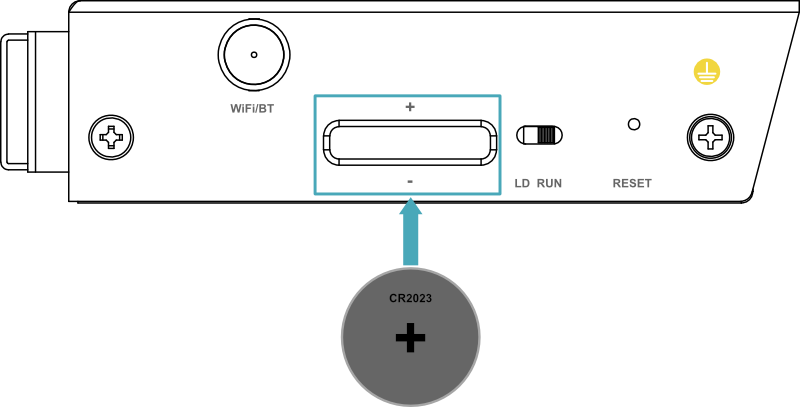
The ED-IPC1000 device supports the installation of a CR2032 battery as an RTC backup power supply. The installation steps are described below.
NOTE
Please turn off the power before installing the RTC battery.
Preparation:
- The CR2032 battery has been obtained.
- The device power supply has been disconnected.
Steps:
- Find the location of RTC battery interface, as indicated in the figure below.

TIP
Before installing the RTC battery, remove the rubber plug from the RTC battery interface.
- Insert the CR2032 battery with the positive terminal facing upward into the corresponding interface, ensuring it is fully seated in the RTC battery base.