
1 Hardware Manual
This chapter introduces the product overview, packing list, appearance, button, indicator and interface.
1.1 Overview
ED-HMI2020-070C is a 7-inch industrial HMI based on Raspberry Pi CM4. According to different application scenarios and user needs, different specifications of RAM and eMMC computer systems can be selected.
- Options for 1GB, 2GB, 4GB and 8GB RAM
- Options for 8GB, 16GB and 32GB eMMC storage
ED-HMI2020-070C provides common interfaces such as HDMI, USB 2.0, USB 3.0, audio and Ethernet, and supports access to the network through Wi-Fi and Ethernet. ED-HMI2020-070C integrates RTC, EEPROM and encryption chip, improving the ease of use and reliability of the product. It is mainly used in industrial control and IOT.
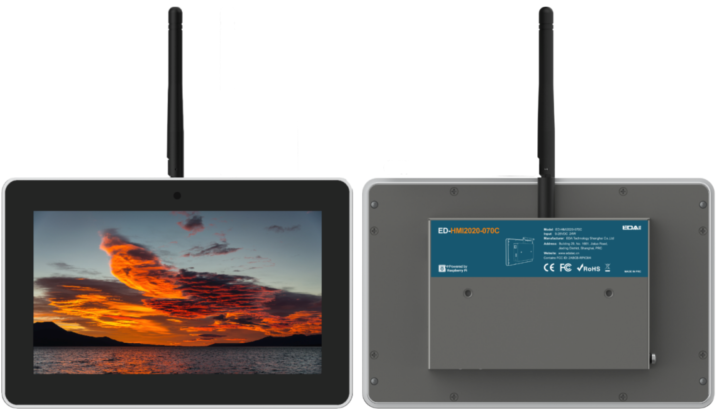
1.2 Packing List
- 1x ED-HMI2020-070C Unit
- 1 x Mounting Kit (including 4 x buckles, 4xM4*10 screws and 4xM4*16 screws)
- [optional Wi-Fi/BT version] 1x 2.4GHz&5GHz Wi-Fi/BT Antenna
1.3 Appearance
Introducing the functions and definitions of interfaces on each panel.
1.3.1 Front Panel
Introducing the front panel interface types and definitions.
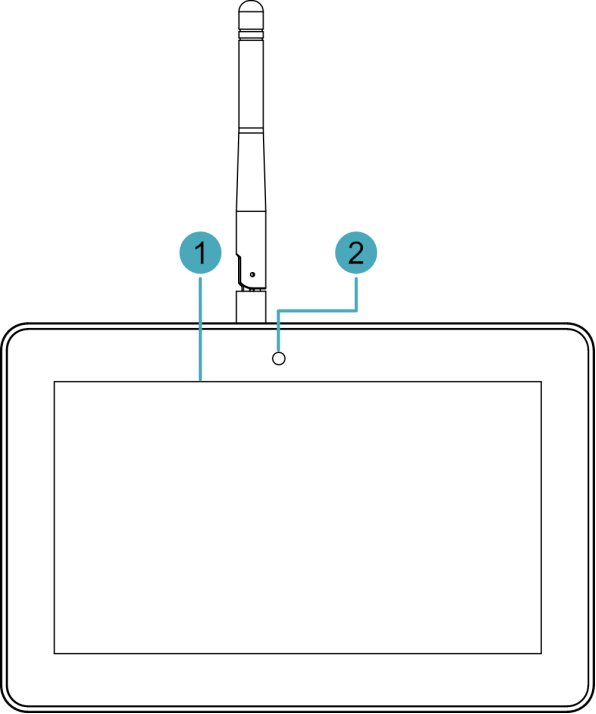
| NO. | Function Definition |
|---|---|
| 1 | 1 x LCD display, 7-inch LCD touch screen, which supports up to 1024x600 resolution and multi-point capacitive touchscreen. |
| 2 | 1 x camera (optional), 8 Megapixel front camera. |
1.3.2 Rear Panel
Introducing the types and definitions of the rear panel interface.

| NO. | Function Definition |
|---|---|
| 1 | 4 x installation holes of buckle, which are used to fix the buckles to the device for installation. |
1.3.3 Side Panel
Introducing the types and definitions of side panel interfaces.
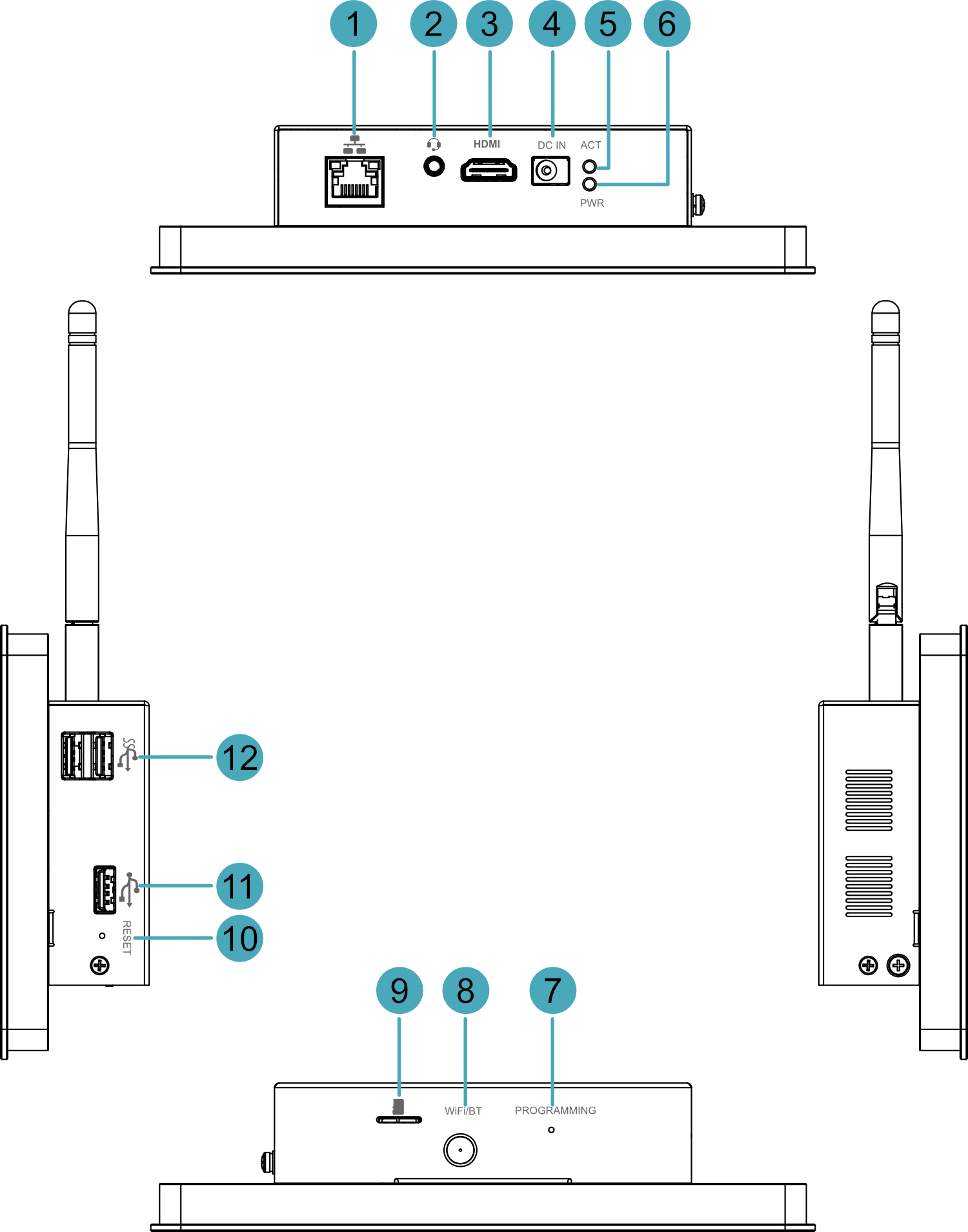
| NO. | Function Definition |
|---|---|
| 1 | 1 x 10/100/1000M adaptive ethernet port, RJ45 connector, with led indicator. It can be used to access the network. |
| 2 | 1 x Audio input/Stereo output, 3.5mm audio jack connector. It can be used as MIC IN and LINE OUT.
|
| 3 | 1 x HDMI port, Type-A connector, which is compatible with HDMI 2.0 standard and supports 4K 60Hz. It supports to connect a displayer. |
| 4 | 1 x DC input, DC Jack connector. It supports 9V~28V input. |
| 5 | 1 x green system status indicator, which is used to view the status of system reading and writing data. |
| 6 | 1 x red power indicator, which is used to check the status of device power-on and power-off. |
| 7 | 1 x PROGRAMING button, which is used to flash to eMMC for the system. |
| 8 | 1 x Wi-Fi/BT antenna port (optional), SMA connector, which can connect to Wi-Fi/BT antenna. |
| 9 | 1 x Micro SD card slot, which is used to install Micro SD card for storing user data. |
| 10 | 1 x Reset button, pressing the button will reset the device. |
| 11 | 1 x USB 2.0 port, Type-A connector, supporting up to 480Mbps transmission rate. |
| 12 | 2 x USB 3.0 ports, Type-A connector, each channel supports up to 5Gbps transmission rate. |
1.4 Button
The section introduces the function of buttons contained in ED-HMI2020-070C.
1.4.1 RESET Button
ED-HMI2020-070C includes a RESET button, which is a hidden button, and the silkscreen on the case is "RESET". Pressing the RESET button will reset the device.
1.4.2 PROGRAMMING Button
ED-HMI2020-101C includes a PROGRAMING button, the silkscreen on the case is "PROGRAMMING".
Press the PROGRAMMING button before the device is powered on (keep pressing it for a long time), and then power on the device (release the PROGRAMMING button after powering on), the system will enter the programming mode. The user can flash to eMMC through the USB 2.0 port on the device and the programming tool.
1.5 Indicator
Introducing the various statuses and meanings of indicators contained in ED-HMI2020-070C.
| Indicator | Status | Description |
|---|---|---|
| PWR | On | The device has been powered on. |
| Blink | Power supply of the device is abnormal, please stop the power supply immediately. | |
| Off | The device is not powered on. | |
| ACT | Blink | The system started successfully and is reading and writing data. |
| Off | The device is not powered on or does not read and write data. | |
| Yellow indicatorof Ethernet port | On | The data transmission is abnormal. |
| Blink | Data is being transmitted over the Ethernet port. | |
| Off | The Ethernet connection is not set up. | |
| Green indicatorof Ethernet port | On | The Ethernet connection is in the normal state. |
| Blink | The Ethernet connection is abnormal. | |
| Off | The Ethernet connection is not set up. |
1.6 Interface
Introducing the definition and function of each interface on ED-HMI2020-070C.
1.6.1 Micro Card Slot
ED-HMI2020-070C includes a Micro SD card slot. The silkscreen on the case of Micro SD card slot is " ", which is used to install Micro SD card for storing user data.
1.6.2 Power Supply
The ED-HMI2020-070C includes one power input, DC Jack connector. The silkscreen on the case is "DC IN", which supports 9V~28V input.
1.6.3 Audio Interface
ED-HMI2020-070C includes one audio input, the connector is a 3.5mm 4-pole headphone jack. The silkscreen of port is " ", which supports OMTP stereo headphone output and mono microphone recording.
- When the headphone is connected, the audio output is switched to the headphone.
- When the headphone is not connected, the audio output is switched to the speaker.
1.6.4 Speaker
The ED-HMI2020-070C contains a power amplifier output, built-in a 4Ω 3W speaker, supporting single-channel stereo output. When playing audio, if the headphone is connected to the Audio interface, the speaker will have no audio output.
1.6.5 1000M Ethernet Interface
ED-HMI2020-070C includes one adaptive 10/100/1000M Ethernet port, and the silkscreen is " ". The connector is RJ45, it is recommended to use the network cable of Cat6 and above. The pins corresponding to the terminal are defined as follows:
 | Pin ID | Pin Name |
|---|---|---|
| 1 | TX1+ | |
| 2 | TX1- | |
| 3 | TX2+ | |
| 4 | TX2- | |
| 5 | TX3+ | |
| 6 | TX3- | |
| 7 | TX4+ | |
| 8 | TX4- |
1.6.6 HDMI Interface
ED-HMI2020-070C includes one HDMI port, the silkscreen is "HDMI". The connector is Type-A HDMI, which can connect to an HDMI display and supports up to 4Kp60.
1.6.7 USB 2.0 Interface
ED-HMI2020-070C includes 1 USB 2.0 port, the silkscreen is " ". The connector is Type-A USB, which can connect to standard USB 2.0 peripherals and supports up to 480Mbps transmission rate.
1.6.8 USB 3.0 Interface
ED-HMI2020-070C includes 2 USB 3.0 ports, the silkscreen is " ". The connector is Type-A USB, which can connect to standard USB 3.0 peripherals and supports up to 5Gbps transmission rate.
1.6.9 Antenna Interface (optional)
The ED-HMI2020-070C includes one SMA antenna port, the silkscreens is "Wi-Fi/BT" and it can be connected to Wi-Fi/BT antenna.
TIP
Only the Wi-Fi/BT version of ED-HMI2020-070C includes an antenna port.