
After executing the dmesg command, an error message related to imx219 appears in the printed log, as shown in the figure below. What should I do?

Solution:
- Execute the following command in the command window to open the
config.txtfile.
sudo nano /boot/firmware/config.txt
- Find the parameter
dtoverlay=imx219in theconfig.txtfile and add a#symbol in front of it (as shown in the figure below) to disable theimx219interface.
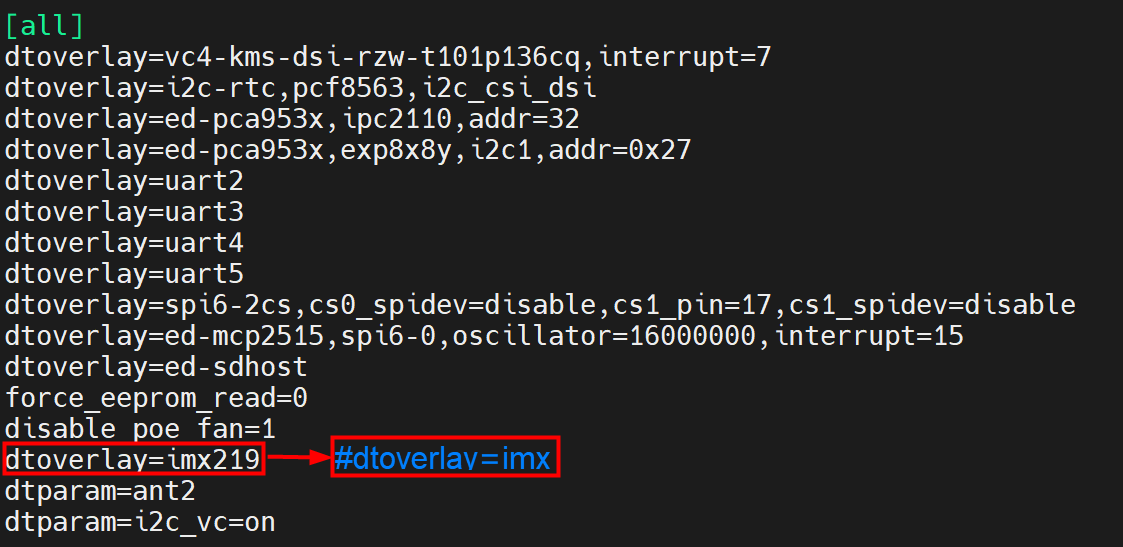
Press
Ctrl+Sto save the changes to the file, and then pressCtrl+Xto exit the file editing mode.Execute the following command to restart the device and make the configuration take effect.
sudo reboot